The Definitive Claude Code Guide
Everything you need to know about Claude Code in one place. Installation, CLAUDE.md, permissions, MCP servers, skills, hooks, subagents, worktrees, cowork, channels, mobile, dispatch, headless mode, agent teams, and the real-world workflows that power users actually rely on.
What This Guide Covers
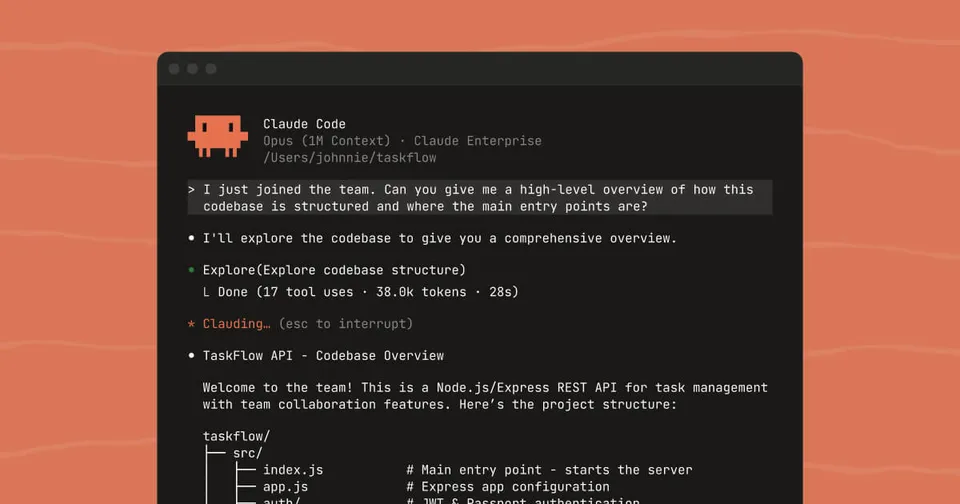
Claude Code is Anthropic’s terminal-native coding agent. Not a chatbot. Not an autocomplete engine. It’s an AI that lives in your terminal, reads your entire codebase, writes and edits files across dozens of modules, runs shell commands, executes tests, creates commits, opens PRs, and spins up parallel work streams. By early 2026, Claude Code was responsible for roughly 4% of all public GitHub commits.
This guide covers every feature, from basic installation to agent teams. It’s organized so you can read it front to back or jump to whatever section you need. Use the table of contents.
Installation
Three methods, one recommendation.
Native installer (recommended)
# macOS / Linux
curl -fsSL https://claude.ai/install.sh | bash

# Windows (PowerShell)
irm https://claude.ai/install.ps1 | iex

# Latest release (early features)
curl -fsSL https://claude.ai/install.sh | bash -s latest
Zero dependencies. No Node.js required. This is the way to go.
Homebrew
brew install claude-codenpm (legacy)
npm install -g @anthropic-ai/claude-codeRequires Node.js 18+. Anthropic considers this method legacy and recommends the native installer instead.
First run
cd your-project
claude
First launch opens a browser window for authentication. You need one of:
- Claude Pro ($20/mo) or Max ($100 or $200/mo) subscription
- Team plan with premium seats ($125/user/mo monthly, $100 annual)
- Enterprise plan
- Anthropic API key with credits
Once authenticated, you’re in.
The Terminal Interface
Claude Code runs in your terminal. No GUI, no browser tab, no electron app. You type what you want in plain English and Claude acts on it.
Input shortcuts
| Shortcut | What it does |
|---|---|
Shift+Enter or \ + Enter | New line in prompt |
Ctrl+G | Open prompt in your default text editor (for long prompts) |
@filename | Mention a file with fuzzy matching |
!command | Run a bash command directly (e.g., !git status) |
Ctrl+V | Paste an image from clipboard |
fn+fn (Mac) or hold Space | Push-to-talk voice input |
Navigation and control
| Shortcut | What it does |
|---|---|
Esc | Stop Claude mid-action (preserves context) |
Esc Esc | Open checkpoint rewind menu |
Ctrl+R | Reverse-search command history |
Ctrl+T | Toggle persistent task list |
Ctrl+B | Send current task to background |
Ctrl+O | Toggle verbose output (see thinking tokens) |
Shift+Tab | Cycle permission modes |
Alt+T | Toggle extended thinking |
Alt+P | Switch model without clearing prompt |
Ctrl+F (twice) | Kill all background agents |
Essential slash commands
| Command | What it does |
|---|---|
/init | Scans codebase and creates a CLAUDE.md file |
/compact | Compresses conversation to save context |
/clear | Fresh conversation, same session |
/cost | Shows token usage and cost |
/model | Switch between available models |
/effort | Control analysis depth (low/medium/high) |
/vim | Toggle vim-style keybindings |
/doctor | Run environment diagnostics |
/help | List all commands |
/voice | Push-to-talk voice mode |
/rename | Name current session for later retrieval |
/color | Set visual prompt bar color (useful when running multiple sessions) |
/btw | Side question that doesn’t enter conversation history |
/loop 5m <prompt> | Run a prompt on a recurring interval |
/batch <instruction> | Large-scale changes across multiple files in parallel worktrees |
/simplify | Review changed code for quality issues, then fix them |
/insights | Generate an HTML analytics report of your usage |
/teleport | Move session between local CLI and web |
/keybindings | Customize keyboard shortcuts |
/theme | Terminal color themes |
/rewind | Rewind conversation and/or code to a checkpoint |
CLAUDE.md: Persistent Project Instructions
CLAUDE.md is the single highest-leverage configuration in Claude Code. It’s a markdown file that gives Claude persistent instructions, loaded at the start of every conversation. Think of it as a README for your AI collaborator.
Where to put them
Claude walks up the directory tree from your working directory, loading every CLAUDE.md it finds. Subdirectory files load on demand when Claude reads files in those directories.
| Scope | Location | Shared with |
|---|---|---|
| Managed policy (org) | /Library/Application Support/ClaudeCode/CLAUDE.md (macOS) or /etc/claude-code/CLAUDE.md (Linux) | All org users |
| Project | ./CLAUDE.md or ./.claude/CLAUDE.md | Team via version control |
| User (personal) | ~/.claude/CLAUDE.md | Just you |
You can also use .claude/rules/*.md files with YAML paths frontmatter to scope instructions to specific file types:
---
paths:
  - "**/*.test.ts"
  - "**/*.spec.ts"
---

Always use `describe` / `it` blocks. Never use `test()`.
Use `vi.mock()` for mocking, not manual stubs.
What belongs in CLAUDE.md
Include:
- Build, test, and lint commands Claude can’t guess
- Code style rules that differ from language defaults
- Architectural decisions specific to your project
- Common gotchas and non-obvious behaviors
- Things Claude should NOT do (often the most critical section)
Exclude:
- Anything Claude can figure out by reading code
- Standard language conventions Claude already knows
- Detailed API documentation (link to it instead)
- File-by-file codebase descriptions
Best practices
Keep it lean. Target under 200 lines per file. Frontier LLMs follow around 150-200 instructions reliably. Claude Code’s system prompt consumes about 50 before your CLAUDE.md loads. Bloated files cause Claude to silently ignore important rules.
Use emphasis for critical rules. Adding “IMPORTANT” or “YOU MUST” to a rule improves adherence for instructions that keep getting violated.
Use @import syntax to pull in other files without bloating the main CLAUDE.md:
@docs/api-conventions.md
@README.md
Run /init to bootstrap. It analyzes your codebase to detect build systems, test frameworks, and coding patterns, then generates a starter CLAUDE.md. Refine from there.
Treat it like code. Commit it to version control. Review it when Claude misbehaves. Prune regularly. Test whether behavior actually shifts when you change a rule.
Team workflow
Boris Cherny (Claude Code’s creator) says every team at Anthropic maintains a CLAUDE.md in git. Any time Claude does something wrong, someone adds a note so it doesn’t repeat the mistake. The whole team contributes multiple times a week.
Auto memory
Separate from CLAUDE.md, Claude has an auto memory system at ~/.claude/projects/<project>/memory/. It saves learnings across sessions: build commands that worked, debugging insights, your preferences. The first 200 lines of MEMORY.md are loaded each session.
Toggle with /memory or the autoMemoryEnabled setting.
Permissions
Claude Code has a tiered permission system that controls what it can do without asking.
Tool categories
| Type | Examples | Approval required |
|---|---|---|
| Read-only | File reads, grep, glob | No |
| Bash commands | Shell execution | Yes |
| File modification | Edit, write files | Yes |
Permission rules
Rules evaluate in order: deny > ask > allow. Deny rules always win.
Configure them in settings files:
~/.claude/settings.json(user-level).claude/settings.json(project-level, commit to git).claude/settings.local.json(local, gitignored)
Rule syntax uses tool names with optional specifiers and glob support:
{
  "permissions": {
    "allow": [
      "Bash(npm run *)",
      "Edit(/src/**/*.ts)",
      "WebFetch(domain:docs.example.com)"
    ],
    "deny": [
      "Bash(rm -rf *)",
      "Edit(/migrations/**)"
    ]
  }
}
Permission modes
Cycle through these with Shift+Tab or set via defaultMode in settings:
| Mode | Description |
|---|---|
default | Standard prompting for each tool use |
acceptEdits | Auto-accepts file edits, still prompts for bash |
plan | Read-only analysis, no modifications allowed |
dontAsk | Auto-denies unless pre-approved in allow rules |
bypassPermissions | Skips all prompts (still blocks writes to .git, .claude, .vscode, .idea) |
—dangerously-skip-permissions
This flag enables bypassPermissions mode from the command line:
claude --dangerously-skip-permissions -p "Fix the auth bug"Only use this inside containers, VMs, or CI environments where you trust the execution context completely. Deny rules still apply even in this mode.
Administrators can disable it entirely via disableBypassPermissionsMode in managed settings.
MCP Servers
Model Context Protocol (MCP) is an open standard that lets Claude Code connect to external tools, databases, and APIs. Claude Code acts as an MCP client. MCP servers provide additional tools Claude can call.
Adding servers
Via CLI:
# HTTP (remote servers)
claude mcp add --transport http my-server https://api.example.com/mcp

# Stdio (local processes)
claude mcp add --transport stdio github npx -y @modelcontextprotocol/server-github
Via config file (.mcp.json in project root):
{
  "mcpServers": {
    "github": {
      "command": "npx",
      "args": ["-y", "@modelcontextprotocol/server-github"]
    },
    "postgres": {
      "command": "npx",
      "args": ["-y", "@modelcontextprotocol/server-postgres"],
      "env": {
        "DATABASE_URL": "postgresql://localhost:5432/mydb"
      }
    }
  }
}
Configuration scopes
| Scope | File | Notes |
|---|---|---|
| Project | .mcp.json | Commit to version control |
| User | ~/.claude.json | Your personal servers |
| Enterprise | Managed mcp.json | Admin-controlled |
Popular MCP servers
| Server | What it does |
|---|---|
| GitHub | PR workflows, issue management, code search |
| Playwright | Browser automation and testing |
| Sentry | Production error monitoring and triage |
| PostgreSQL / Supabase | Direct database queries |
| Context7 | Real-time library documentation (reduces hallucinations) |
| Chrome DevTools | Inspect network requests in existing browser |
| Figma | Design-to-code workflows |
| Slack | Team messaging integration |
| Docker | Container management |
Managing servers
Use the /mcp command to view and manage all configured servers. @mention a server name to toggle it on or off.
Context cost warning
MCP tools consume context just by being available. Tool descriptions load automatically, and browser automation tools are particularly heavy. Use /context to audit per-tool overhead (8-30% of context). Remove servers you aren’t actively using.
MCP Tool Search (lazy loading) reduces this overhead by up to 95%, letting you keep many servers configured without context bloat. Tools load only when Claude actually needs them.
Enterprise controls
allowManagedMcpServersOnlyrestricts users to admin-approved servers onlyallowedMcpServersanddeniedMcpServersfor allowlist/denylist management
Skills
Skills are prompt-based capabilities that extend Claude Code. They replaced the older “custom commands” system, though existing command files still work.
Built-in skills
| Skill | Purpose |
|---|---|
/batch <instruction> | Decompose work into 5-30 units, spin up parallel worktrees, execute |
/claude-api | Load Claude API reference for your language |
/debug [description] | Troubleshoot the current session |
/loop [interval] <prompt> | Run a prompt repeatedly on a schedule |
/simplify [focus] | Review changed files for code quality, then fix issues |
Creating custom skills
Create a SKILL.md file with YAML frontmatter:
Project-level: .claude/skills/<name>/SKILL.md (shared via git)
Personal: ~/.claude/skills/<name>/SKILL.md (just you)
---
name: tdd
description: "Implement features using strict test-driven development"
user-invocable: true
allowed-tools:
  - Read
  - Edit
  - Write
  - Bash
---

Follow strict TDD methodology:

1. Write a failing test first. Run it. Confirm it fails.
2. Write the minimum code to make it pass. Run the test. Confirm it passes.
3. Refactor if needed. Run all tests. Confirm nothing broke.

Never write implementation code before the test exists.
Key frontmatter fields
| Field | Purpose |
|---|---|
name | Display name |
description | When Claude should invoke this skill |
user-invocable | Whether users can trigger it via /name |
disable-model-invocation | Manual only, Claude won’t auto-trigger |
allowed-tools | Which tools this skill can use |
model | Force a specific model (sonnet/opus/haiku) |
context | fork runs in a subagent with its own context |
agent | Custom agent name for execution |
hooks | Skill-specific lifecycle hooks |
effort | Analysis depth override |
String substitutions
Use these in your skill content:
$ARGUMENTSor$0- everything after the slash command$ARGUMENTS[1],$ARGUMENTS[2],$1,$2- positional arguments${CLAUDE_SESSION_ID}- current session ID${CLAUDE_SKILL_DIR}- directory containing the SKILL.md
Dynamic context injection
The !`command` syntax runs a shell command before the skill content is sent, replacing the placeholder with the command’s output:
Current git status:
!`git status --short`

Recent commits:
!`git log --oneline -10`
Tips
- Keep skills under 500 words. They consume context every time they load.
- One skill per workflow. “Do everything” skills are less effective.
- Use imperative verbs: “Review the code”, “Write tests”, not “This skill reviews code”.
- Include output format instructions if you need structured results.
- About 45% of teams share more than 10 custom skills via their git repository.
Hooks
Hooks are user-defined shell commands that execute at specific points in Claude Code’s lifecycle. Unlike CLAUDE.md instructions (which are advisory), hooks are guaranteed to execute.
Hook types
| Type | What it does |
|---|---|
command | Runs a shell command |
http | POSTs event data to a URL |
prompt | Single-turn LLM evaluation (uses Haiku by default) |
agent | Multi-turn verification with full tool access |
Key lifecycle events
Claude Code exposes 22 hook events. Here are the most useful:
| Event | When it fires |
|---|---|
SessionStart | Session begins or resumes |
UserPromptSubmit | Before your prompt is processed |
PreToolUse | Before a tool executes (can block with exit code 2) |
PostToolUse | After a tool executes |
PermissionRequest | When a permission dialog appears |
Stop | When Claude finishes a response |
Notification | When Claude needs your attention |
SubagentStart / SubagentStop | Subagent lifecycle events |
PreCompact / PostCompact | Around conversation compaction |
WorktreeCreate / WorktreeRemove | Git worktree lifecycle |
SessionEnd | Session terminates |
Exit codes
- 0 = proceed normally
- 2 = block the action (stderr message becomes Claude’s feedback)
- Other = proceed but log a warning
Configuration
Add hooks to .claude/settings.json (project) or ~/.claude/settings.json (user):
{
  "hooks": {
    "PostToolUse": [
      {
        "type": "command",
        "matcher": "Edit",
        "command": "npx prettier --write $CLAUDE_FILE_PATH"
      }
    ],
    "PreToolUse": [
      {
        "type": "command",
        "matcher": "Edit(/migrations/**)",
        "command": "echo 'Blocked: do not modify migration files' >&2 && exit 2"
      }
    ]
  }
}
Practical examples
- Auto-format after every edit: Run Prettier/ESLint on the edited file via
PostToolUse - Block writes to sensitive paths: Exit code 2 in
PreToolUsefor migrations, configs - Type-check before Claude stops: Run
tsc --noEmitin aStophook - Scan for leaked secrets: Check prompts in
UserPromptSubmitfor API key patterns - Restart dev server after changes: Kill and restart in
PostToolUse
Use the /hooks command for interactive setup without editing JSON directly.
Plugins
Plugins arrived in Claude Code 2.1 and are the standard way to share, install, and version compound features. A single plugin can contain skills, hooks, subagents, MCP server definitions, rules, status-line customizations, and LSP configurations.
Installing a plugin
# Add a marketplace
/plugin marketplace add anthropics/claude-code-plugins

# Browse and install
/plugin

# Install directly by name
/plugin install code-reviewer@anthropics/claude-code-plugins
Plugin layout
my-plugin/
├── plugin.json          # Manifest (name, version, description, exports)
├── skills/              # Bundled skills
│   └── tdd/SKILL.md
├── hooks/
│   └── hooks.json
├── agents/              # Subagent definitions
│   └── reviewer.json
├── mcp/                 # MCP server configs
│   └── servers.json
├── rules/               # Path-scoped rules
│   └── api.md
└── README.md
Common plugin manifests
The plugin.json declares what the plugin provides:
{
  "name": "tdd-toolkit",
  "version": "1.2.0",
  "description": "Strict TDD workflow with red/green/refactor enforcement",
  "skills": ["skills/tdd"],
  "hooks": "hooks/hooks.json",
  "agents": ["agents/test-runner.json"],
  "mcp": "mcp/servers.json",
  "compatibility": {
    "claudeCode": ">=2.1.0"
  }
}
Marketplaces
Marketplaces are git repos that index plugins. Three common patterns:
- Public:
anthropics/claude-code-plugins(Anthropic’s curated set) - Team: a private GitHub repo your team installs as a marketplace
- Local dev:
/plugin install --plugin-dir ./my-pluginto test before publishing
Useful slash commands
| Command | What it does |
|---|---|
/plugin | Browse installed and available plugins |
/plugin install <name> | Install from any registered marketplace |
/plugin remove <name> | Uninstall |
/plugin marketplace add <repo> | Register a new marketplace |
/plugin marketplace remove <repo> | Unregister a marketplace |
/plugin --plugin-dir <path> | Run a local in-development plugin |
IDE Integration
VS Code Extension
The most polished IDE integration. Install from the VS Code Marketplace (search “Claude Code”). Requires VS Code 1.98.0+.
Key features:
- Native chat panel in sidebar, editor tab, or separate window
- Checkpoint-based undo: fork conversation, rewind code, or both
@-mention files with line ranges (@file.ts#5-10)- Multiple parallel conversations in tabs
- Plan mode renders plans as full markdown with inline commenting
- Auto-accept mode for hands-off execution
- Prompt suggestions based on context
- Runs a local IDE MCP server for diff viewing and Jupyter notebook execution
Shortcuts:
| Shortcut | Action |
|---|---|
Cmd+Esc / Ctrl+Esc | Toggle focus between editor and Claude |
Option+K / Alt+K | Insert @-mention from current selection |
Cmd+Shift+P → “Claude” | Access all Claude commands |
Settings: selectedModel, useTerminal (CLI mode), initialPermissionMode, autosave, useCtrlEnterToSend.
JetBrains Plugin (Beta)
Available from the JetBrains Marketplace. Runs Claude Code CLI inside the IDE’s integrated terminal and opens proposed changes in the native diff viewer. Same chat experience with file references and conversation history.
Subagents
Subagents are specialized AI assistants that run in their own context window. They keep exploration, research, and implementation work out of your main conversation, preventing context bloat.
Built-in subagents
| Agent | Model | Purpose |
|---|---|---|
| Explore | Haiku (fast) | Read-only file discovery and codebase search |
| Plan | Inherits parent | Research for plan mode |
| General-purpose | Inherits parent | Complex multi-step tasks needing both reading and writing |
| Bash | Inherits parent | Terminal commands in a separate context |
Creating custom subagents
Create markdown files with YAML frontmatter in .claude/agents/ (project) or ~/.claude/agents/ (user). Use the /agents command for interactive creation.
---
name: security-reviewer
description: "Reviews code changes for security vulnerabilities"
model: sonnet
tools:
  - Read
  - Grep
  - Glob
  - Bash
disallowedTools:
  - Edit
  - Write
maxTurns: 30
---

Review all staged changes for security vulnerabilities.
Check for:
- SQL injection
- XSS
- Command injection
- Hardcoded secrets
- Insecure dependencies

Output a structured report with severity ratings.
Key configuration options
| Field | Purpose |
|---|---|
name | Agent identifier |
description | When to invoke this agent (Claude matches on this) |
tools / disallowedTools | Allowed/blocked tool lists |
model | Force sonnet/opus/haiku/inherit |
permissionMode | Override permission handling |
maxTurns | Limit execution length |
skills | Preload specific skills |
mcpServers | Agent-specific MCP servers |
hooks | Agent-specific lifecycle hooks |
memory | Enable cross-session memory (user/project/local scope) |
background | Run in background (true/false) |
isolation | worktree for git-isolated execution |
effort | Analysis depth |
How they work
Each subagent gets its own isolated context window (up to 200K tokens). Only the final output returns to the parent. All intermediate file reads, searches, and tool calls stay in the subagent’s context, keeping your main conversation clean.
Architectural constraint: Subagents cannot spawn other subagents. This prevents infinite nesting.
Invocation methods:
- Automatic delegation based on description matching
- Natural language request (“have the security reviewer check this”)
@mentionby name--agent <name>flag for session-wide use
Context Management
Context is the most important resource in Claude Code. Performance degrades as the context window fills up. Managing it well is the difference between a productive session and one where Claude starts forgetting what you asked five minutes ago.
How it works
Claude Code’s context window holds the conversation history, tool results, CLAUDE.md contents, and MCP tool descriptions. When it fills to ~95% capacity, auto-compaction kicks in, summarizing the conversation to free space.
The 1M token context window is available for Max, Team, and Enterprise plans (as of v2.1.75). Other plans get the standard 200K window.
Key commands
| Command | What it does |
|---|---|
/compact | Summarize conversation, ~60-70% token reduction |
/compact Focus on the API changes | Directed compaction preserving specific topics |
/clear | Start fresh (most recommended tip across all sources) |
/cost | Check current token usage |
/btw | Side question that never enters history |
Strategies
Clear between unrelated tasks. This is the single most recommended tip across Reddit, HN, and official docs. Mixing unrelated tasks in one session fills context with irrelevant noise.
Compact proactively at 70-80% capacity. Manual compaction runs while there’s still headroom, producing better summaries than auto-compaction under pressure.
Use directed compaction. /compact Focus on the API changes tells Claude what to preserve. Critical decisions, file paths, and architectural context survive. Tangential exploration gets dropped.
Use subagents for investigation. Send exploration tasks to a subagent. Only the summary comes back. Hundreds of file reads stay out of your main context.
Use /btw for side questions. Quick questions that don’t need to persist in history. No tool access, but no context cost either.
Don’t edit files manually during a session. It busts Claude’s file cache, forcing re-reads that consume context.
Disable format-on-save in your editor. Auto-formatting changes file timestamps, invalidating Claude’s cache.
Custom compaction instructions
Add to your CLAUDE.md:
When compacting, always preserve:
- The full list of modified files
- Any test commands and their results
- Architectural decisions made during this session
You can also use a PostCompact hook to re-inject critical context after every compaction.
Git Integration
Claude Code works with git natively. It reads diffs, understands branches, writes commit messages, and creates pull requests.
Common operations
Just ask in natural language:
- “Commit these changes with a descriptive message”
- “Create a PR for this feature”
- “What changed since yesterday?”
- “Rebase this branch on main”
- “Summarize the changes on this branch”
Claude reads the diff, writes a meaningful commit message, and adds a Co-Authored-By attribution header by default.
PR creation
Claude uses gh pr create under the hood. It analyzes all commits on the branch, generates a title, summary, and test checklist. Sessions are automatically linked to PRs. Resume a PR’s context later with:
claude --from-pr 42GitHub Actions
Anthropic publishes an official GitHub Action (anthropics/claude-code-action) for:
- Automated PR reviews triggered by
@claudementions - Issue resolution when issues are assigned to Claude
- Code generation from issue descriptions
- CI/CD pipeline automation
Average code review time: 15-45 seconds depending on diff size. Over 60% of teams using Claude Code in CI integrate via this action.
Configuring git behavior
Add to your CLAUDE.md:
## Git conventions
- Branch names: feature/ticket-id-short-description
- Commit messages: imperative mood, max 72 chars for subject line
- Always run tests before committing
- Never force-push to main
Worktrees
Git worktrees create separate working directories that share the same repository history. Each worktree has its own branch and working files. Claude Code has built-in support.
Usage
# Create a named worktree and start a session in it
claude --worktree feature-auth
# or shorthand
claude -w feature-auth

# Auto-generated name
claude -w
This creates an isolated worktree at .claude/worktrees/<name>/, checks out a new branch worktree-<name>, and starts a session scoped to that directory.
Why use worktrees
Run multiple Claude sessions simultaneously on different parts of a project. Each session gets its own branch and files. Zero interference between sessions. No stashing, no branch-switching, no merge conflicts mid-session.
Subagent worktrees
Set isolation: worktree in a subagent’s frontmatter. Each subagent gets its own worktree, automatically cleaned up when finished without changes.
Cleanup
- No changes = auto-removed
- Changes exist = Claude prompts to keep or remove
- Add
.claude/worktrees/to your.gitignore
Non-git VCS
Configure WorktreeCreate and WorktreeRemove hooks for custom worktree logic with SVN, Perforce, or Mercurial.
Headless Mode and Background Agents
Headless mode
Run Claude non-interactively with the -p (or --print) flag. Process a single prompt and exit. Built for scripts, CI/CD, and automation.
claude -p "Find and fix the bug in auth.py" --allowedTools "Read,Edit,Bash"Output formats:
| Flag | Format |
|---|---|
--output-format text | Plain text (default) |
--output-format json | Structured JSON with metadata |
--output-format stream-json | Real-time streaming JSON |
--bare mode skips auto-discovery of hooks, skills, plugins, MCP servers, and CLAUDE.md. Fastest startup, most consistent results. Recommended for scripted calls and CI.
Structured output: Use --json-schema to force output conforming to a specific schema.
Background agents
Press Ctrl+B while Claude is working to send the current task to the background. The agent:
- Runs in a separate process
- Continues even if you close your terminal
- Reports results via system notification when done
Disable with CLAUDE_CODE_DISABLE_BACKGROUND_TASKS=1.
Fan-out pattern
Run multiple headless instances for batch operations:
for file in $(cat files-to-migrate.txt); do
  claude -p "Migrate $file from React class components to hooks. Return OK or FAIL." \
    --allowedTools "Edit,Bash(git commit *)" &
done
wait
Continuing conversations
# Resume the most recent session
claude --continue

# Resume a specific session
claude --resume session-id
Cowork
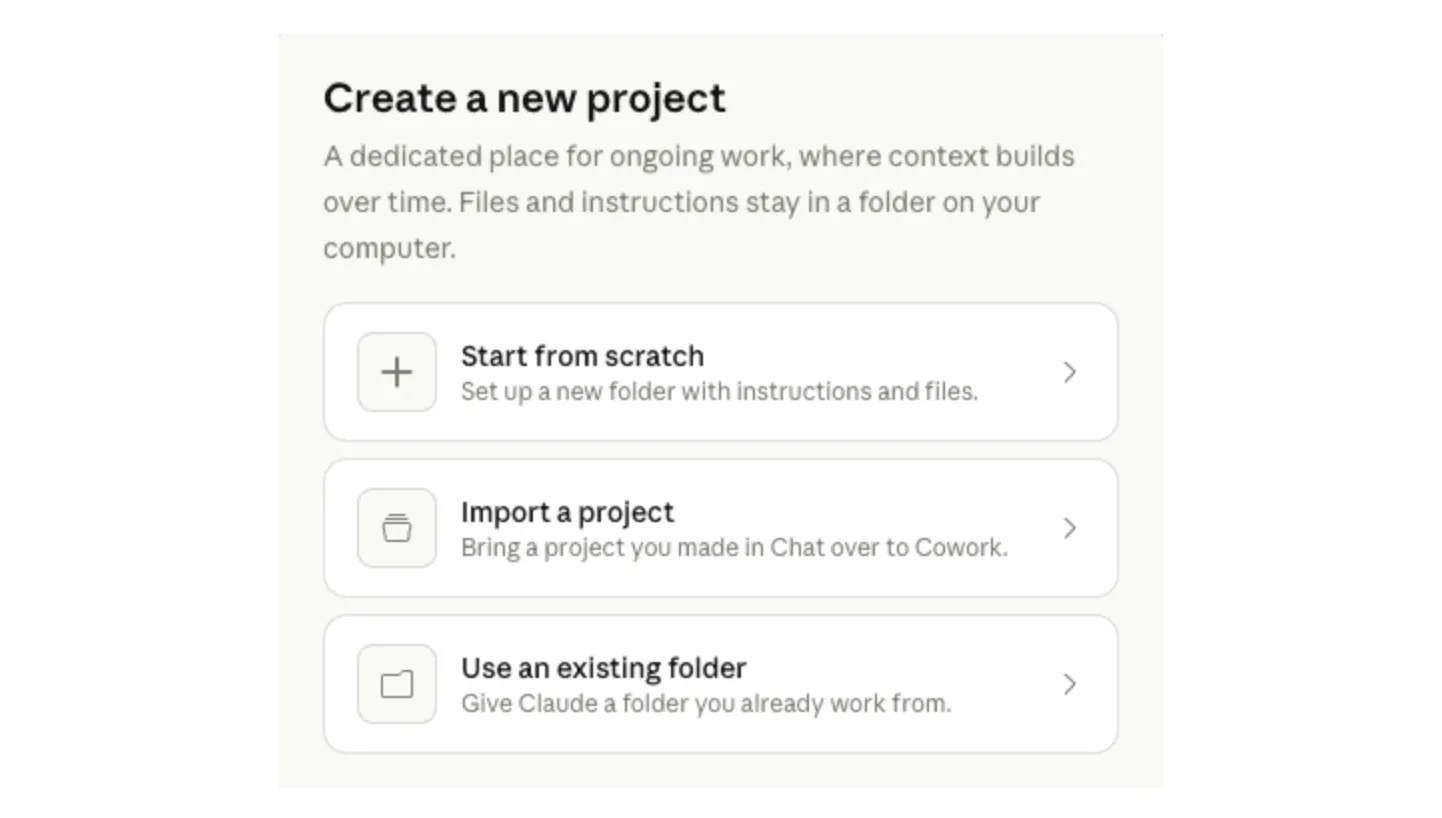
Cowork brings Claude Code’s agentic capabilities to Claude Desktop for knowledge work beyond coding. It’s a research preview available on macOS and Windows.
What it does
Open Claude Desktop, switch to Cowork mode, describe what you want. Claude creates a plan, breaks work into subtasks, and executes them. You can monitor progress, provide direction mid-task, or let it run independently.
Key capabilities
- File access: Choose which folders Claude can read and write
- Scheduled tasks: Set up recurring work that survives app restarts
- Multi-step execution: Complex tasks broken into subtasks with progress tracking
- Dispatch from mobile: Fire off tasks from your phone, Claude handles execution on your machine
Availability
Pro ($20/mo), Max, Team, and Enterprise subscribers on macOS and Windows.
How it differs from Claude Code
Claude Code is CLI-based, designed for developers in the terminal. Cowork is a graphical interface in Claude Desktop, designed for knowledge workers who want agent capabilities without a terminal.
Channels
Channels are MCP servers that push events into a Claude Code session so Claude can react to things happening outside the terminal. Research preview, requires v2.1.80+.
Types
| Type | What it does |
|---|---|
| One-way | Forward alerts, webhooks, monitoring events to Claude |
| Two-way | Also expose a reply tool so Claude can send messages back |
| Permission relay | Forward tool approval prompts to remote devices |
How they work
A channel is an MCP server running locally as a subprocess over stdio. It bridges external systems (chat platforms, webhooks) to the Claude Code session.
For chat platforms, the plugin polls the platform API. For webhooks, it listens on a local HTTP port.
Supported platforms (research preview)
- Telegram - Two-way messaging with Claude Code
- Discord - Two-way messaging with Claude Code
- Custom channels via
--dangerously-load-development-channels
Permission relay
Two-way channels can opt into receiving permission prompts. This lets you approve or deny Claude’s tool use from Telegram or Discord on your phone while Claude runs on your desktop.
Enterprise controls
Team and Enterprise organizations must explicitly enable channels before users can add them.
Remote Control (Mobile)
Remote Control bridges your local Claude Code terminal session with claude.ai/code, the iOS app, and the Android app. Claude keeps running locally while messages route through Anthropic’s API over TLS.
Setup
# Start remote control
claude remote-control

# Or from inside a session
/remote-control
The terminal displays a QR code. Scan it with the mobile app or open the URL in a browser.
How it works
- Your local session makes outbound HTTPS requests only, never opens inbound ports
- All traffic travels through Anthropic’s API, encrypted via TLS
- Your full local environment (filesystem, MCP servers, tools, project config) stays available
- Conversation syncs across all connected devices
Requirements
- Claude Code v2.1.52+
- Max subscription for Claude Code mobile access
Third-party option
Happy is a free, open-source mobile app for Claude Code with end-to-end encryption. An alternative to Anthropic’s built-in remote control.
Scheduled Tasks and Dispatch
Session-scoped scheduling
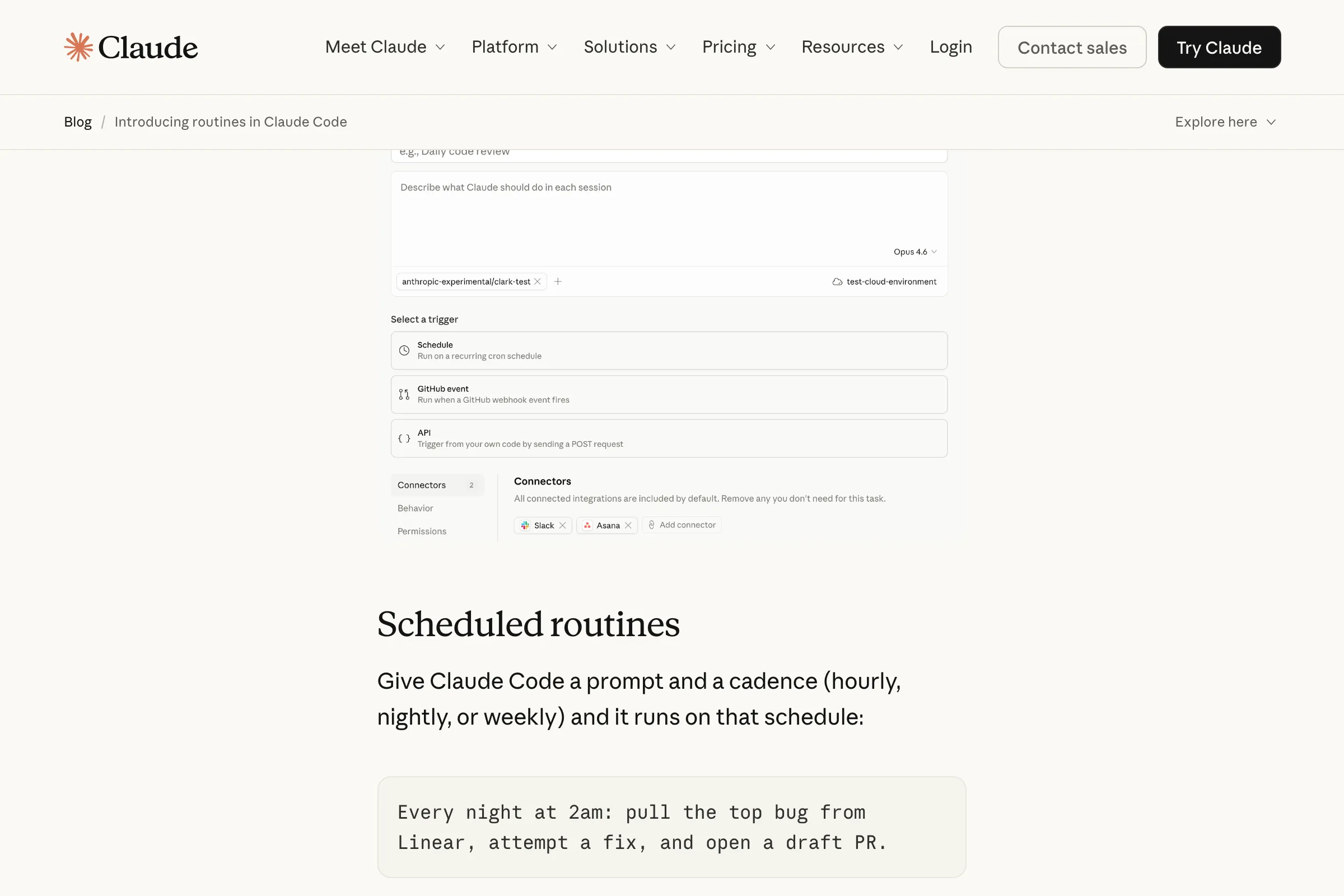
The /loop skill runs a prompt on a recurring interval within an active session:
/loop 5m check if the deployment finished
/loop 1h run the test suite and report failures
Supports s (seconds), m (minutes), h (hours), d (days). Defaults to 10 minutes if no interval is specified.
One-time reminders
Natural language works:
remind me at 3pm to push the release branchClaude schedules a single-fire task.
Management
- Up to 50 scheduled tasks per session
- 3-day expiry for recurring tasks
- Session-scoped only (gone when you exit)
- No catch-up for missed fires
- Minute-level granularity
Dispatch (via Cowork)
Cowork in Claude Desktop supports durable scheduled tasks that survive app restarts and run without an active terminal session. Assign tasks through a persistent conversation thread accessible from both desktop and mobile.
Agent Teams (Experimental)
Agent Teams let multiple Claude Code instances coordinate as a team. One session is the team lead, others are teammates. Each has its own full context window.
Enabling
# Environment variable
export CLAUDE_CODE_EXPERIMENTAL_AGENT_TEAMS=1

# Or in settings.json
{ "env": { "CLAUDE_CODE_EXPERIMENTAL_AGENT_TEAMS": "1" } }
Architecture
- Team lead + teammates + shared task list + mailbox messaging
- Tasks have pending/in-progress/completed states with dependency tracking
- Teammates communicate directly with each other (unlike subagents, which only report to parent)
- Teammates claim work from a shared list
Display modes
| Mode | How it works |
|---|---|
| In-process | All agents in one terminal, Shift+Down to cycle between them |
| Split panes | Use tmux or iTerm2 to see all agents simultaneously |
When to use teams vs. subagents
| Feature | Subagents | Agent Teams |
|---|---|---|
| Communication | Report to parent only | Communicate with each other |
| Context | Isolated, summary returns | Each has full independent context |
| Work distribution | Parent assigns | Teammates claim from shared list |
| Persistence | Ephemeral | Run as long as the lead session |
| Best for | Investigation, code review | Parallel implementation, competing hypotheses |
Guidance
- Start with 3-5 teammates and 5-6 tasks per teammate
- Token usage scales linearly with team size
- Each teammate gets its own full context window
Claude Agent SDK
The Claude Agent SDK (formerly “Claude Code SDK”) gives you programmatic access to the same tools, agent loop, and context management that power Claude Code. Available in Python and TypeScript.
Installation
# Python
pip install claude-agent-sdk

# TypeScript
npm install @anthropic-ai/claude-agent-sdk
What it provides
Everything Claude Code can do, available as a library:
- Built-in tools: Read, Write, Edit, Bash, Glob, Grep, WebSearch, WebFetch, AskUserQuestion
- Hooks: Callback functions for lifecycle events
- Subagents: Spawn child agents with isolated context
- MCP integration: Connect to any MCP server
- Permissions: Same permission system as Claude Code
- Sessions: Resume, fork, and manage conversations
- Skills and CLAUDE.md: Same configuration, same memory
Use cases
- CI/CD pipeline automation
- Custom coding agents with domain-specific knowledge
- Research agents that search, summarize, and report
- Customer support agents with tool access
- Production automation scripts
Authentication
Requires ANTHROPIC_API_KEY. Also supports AWS Bedrock, Google Vertex AI, and Azure Foundry credentials.
Branding note
Products built with the SDK must maintain their own branding. “Claude Code” branding is not permitted in third-party products.
Pricing and Plans
| Plan | Price | Claude Code access |
|---|---|---|
| Free | $0 | No |
| Pro | $20/mo ($17/mo annual) | Yes |
| Max 5x | $100/mo | Yes, 5x usage limits |
| Max 20x | $200/mo | Yes, 20x usage limits |
| Team (standard) | $25-30/user/mo | No |
| Team (premium) | $125/user/mo (monthly) or $100/user/mo (annual) | Yes |
| Enterprise | Custom | Yes, with SSO, audit logging, compliance |
| API | Pay-per-token | Yes, starting at $3/M input tokens |
What you get with Max
All Pro features plus higher usage limits (weekly reset), early access to new features, priority access during peak times, 1M token context window, access to Cowork and Remote Control.
Real-world cost patterns
From community reports:
- Disciplined sessions with good context management: $0.50-0.75 per task
- Heavy daily use: $35-40/day
- Complex multi-file refactors: $5-15 per session
- Undisciplined exploration without compaction: costs escalate fast
Cost-saving strategies
- Tell Claude to read specific files, not search the entire codebase
- Use
/costto track spending mid-session - Use the Haiku model for low-stakes tasks (boilerplate, formatting)
- Disable format-on-save in your editor (prevents cache-busting)
- Use worktrees instead of context-switching in one session
/clearbetween unrelated tasks
Power User Workflows
These are real patterns used by experienced Claude Code developers.
The Boris Cherny workflow
Claude Code’s creator runs 5 instances in parallel in his terminal, numbered 1-5, using system notifications to know when one needs input. He also runs 5-10 instances on claude.ai in the browser, using /teleport to hand off work between web and local.
His process:
- Start in Plan Mode, iterate until the plan is solid
- Switch to auto-accept edits mode
- Claude usually one-shots the implementation from a good plan
His most important tip: Give Claude a way to verify its work. A feedback loop (bash command, test suite, browser testing) is the single highest-leverage thing you can do.
Research-Plan-Annotate cycle
From Boris Tane:
- Research phase: Have Claude deeply read relevant folders and write findings to
research.md - Planning phase: Request detailed
plan.mdwith code snippets, file paths, trade-offs - Annotation cycle: Review the plan in your editor, add inline notes, resubmit. Repeat 1-6 times.
- Implementation: “Implement it all. Mark tasks completed in plan. Do not stop until finished.”
Let Claude interview you
Start with a minimal description and ask Claude to interview you about requirements. It asks about technical implementation, UI/UX, edge cases, and tradeoffs you haven’t considered. Write the output to SPEC.md, then start a fresh session to implement from the spec.
The /scratch directory pattern
Maintain a git-ignored /scratch folder for temporary scripts and experimentation. Keeps the working tree and context window cleaner.
Writer/Reviewer pattern
Have one Claude instance implement, another review in a fresh context. The reviewer avoids self-bias because it starts without the implementation context.
9-agent code review
One developer runs 9 parallel subagents for code review: test runner, linter, security reviewer, code reviewer, quality reviewer, test quality reviewer, performance reviewer, dependency reviewer, simplification reviewer. Reports ~75% useful suggestions.
Mermaid diagram preloading
Store architecture diagrams in docs/diagrams/ and preload at session start:
claude --append-system-prompt "$(cat docs/diagrams/*.md)"LLMs parse Mermaid syntax efficiently. A few hundred tokens convey what would take thousands in prose.
Extended Thinking and Effort Levels
Claude Code can allocate more reasoning tokens to difficult problems.
The /effort command
Controls analysis depth across three levels:
| Level | When to use |
|---|---|
| Low | Quick tasks, boilerplate, formatting |
| Medium | Standard development tasks (default) |
| High | Complex architecture, debugging, security review |
Ultrathink
Including “ultrathink” in your prompt activates high effort mode, allocating maximum reasoning tokens. The old keyword hierarchy (think / think hard / think harder / megathink / ultrathink) is deprecated as of January 2026. Only “ultrathink” still works.
Reasoning is increasingly baked into the flagship models natively, so explicit effort control matters less than it used to.
Common Mistakes to Avoid
These are the patterns that trip up beginners and waste experienced developers’ time.
1. No CLAUDE.md file. Every session starts cold without one. Run /init immediately in a new project.
2. Kitchen sink sessions. Mixing unrelated tasks in one session fills context with irrelevant noise. Use /clear between tasks. This is the most common mistake and the easiest to fix.
3. Correcting over and over. After two failed corrections, start fresh with /clear and a better prompt incorporating what you learned. Continuing to correct in-context often makes things worse.
4. Over-specified CLAUDE.md. If it’s too long, Claude ignores half of it. Keep it under 200 lines. Prune ruthlessly.
5. Jumping straight to code. Use Plan Mode (Shift+Tab to cycle) for anything beyond trivial changes. Separate research and planning from implementation.
6. Infinite exploration. Asking Claude to “investigate” or “look into” something without scoping it. It reads hundreds of files, filling context with information you didn’t need. Use subagents for open-ended exploration.
7. MCP server overload. Every installed server consumes context just by existing, even if you never use it. Remove servers you aren’t actively using.
8. Marathon sessions without compacting. Run /compact at 70-80% capacity, especially when switching sub-tasks.
9. Vague prompts for specific tasks. Reference specific files, mention constraints, point to example patterns. “Fix the auth bug” is worse than “Fix the session expiry bug in src/auth/middleware.ts, the token refresh logic on line 47 isn’t handling expired refresh tokens.”
10. Trusting without verifying. Always provide tests, scripts, or screenshots for verification. Claude’s creator says this is the single highest-leverage thing you can do.
Claude Code vs. The Competition
The community consensus, distilled from hundreds of Reddit threads, HN discussions, and developer blogs:
“Cursor is the best AI editor. Claude Code is the best AI engineer.”
The 80/15/5 rule
- 80% of coding work is autocomplete and inline edits. Cursor excels here.
- 15% is medium-complexity agent tasks. Either tool works.
- 5% is complex multi-file refactors and architectural changes. Claude Code dominates.
Where Claude Code wins
- Handles 20+ file refactors in a single session
- Better debugging through dialogue (explains reasoning, not just patches)
- 200K-1M token usable context (vs. Cursor’s smaller windows)
- Uses 5.5x fewer tokens than Cursor for equivalent tasks
- 46% “most loved” rating in developer surveys vs. Cursor’s 19%
- 67% win rate in blind code quality tests
Where Cursor wins
- $20/mo flat pricing vs. $100-200/mo for Claude Max
- Built-in autocomplete and tab completions
- No terminal learning curve
- Better for quick, small edits and inline suggestions
Many developers use both
Cursor for inline completions and small edits. Claude Code for complex agent work, debugging, and multi-file changes.
Quick Reference Card
Starting a session
claude                           # Start in current directory
claude -w feature-auth           # Start in isolated worktree
claude --from-pr 42              # Resume from a PR
claude --continue                # Continue last session
claude --agent security-reviewer # Use a specific agent
claude --bare -p "prompt"        # Headless, no auto-discovery
claude remote-control            # Enable mobile access
During a session
/init              Bootstrap CLAUDE.md
/compact            Compress context
/clear              Fresh start
/cost               Check spending
/model              Switch models
/effort high        Deep analysis
Shift+Tab           Cycle permission modes
Ctrl+B              Background current task
Esc Esc             Rewind to checkpoint
/btw quick question Side question (no history)
/loop 5m check X    Recurring task
@filename           Reference a file
!git status         Direct bash command
Files that matter
CLAUDE.md                        Project instructions (root)
.claude/CLAUDE.md                Alternative location
.claude/settings.json            Project permissions and hooks
.claude/settings.local.json      Local settings (gitignored)
.claude/skills/*/SKILL.md        Custom skills
.claude/agents/*.md              Custom subagents
.claude/rules/*.md               Path-scoped rules
.mcp.json                        MCP server config
~/.claude/CLAUDE.md              Personal global instructions
~/.claude/settings.json          User-level settings
~/.claude/skills/*/SKILL.md      Personal skills
~/.claude/agents/*.md            Personal agents
Productivity: Expectations vs. Reality
The honest picture, drawn from community reports and research.
The optimistic view:
- Claude Code surpassed $1B annualized revenue by November 2025
- Anthropic teams report 80% reduction in research time
- Bug fixing averages 58 seconds vs. Copilot’s 73 seconds
- 4% of public GitHub commits by early 2026
The sobering data:
- METR research found skilled developers took 19% longer on tasks when using Claude Code (though this finding is debated)
- Developers report being able to fully delegate only 0-20% of tasks
- Most honest community assessment: 20-40% productivity gains when combining multiple strategies
The real pattern: Claude Code doesn’t make you 10x faster at everything. It makes certain categories of work dramatically faster (boilerplate, refactoring, test writing, debugging, documentation) while adding overhead to others (reviewing AI output, course-correcting, managing context). The net gain depends entirely on your workflow discipline.
The developers who get the most value share three habits:
- They plan before they code (Plan Mode, specs, architecture docs)
- They give Claude verification tools (tests, type checkers, linters)
- They manage context aggressively (
/clear,/compact, subagents)
Further Resources
- Claude Code Documentation - Official reference
- Best Practices - Anthropic’s own tips
- Claude Code Changelog - What’s new
- GitHub: claude-code-action - GitHub Actions integration
- Claude Agent SDK - Build your own agents
- Boris Cherny’s Workflow - How the creator uses it
- Claude Code Plugins - Plugin ecosystem
Last updated: March 2026. Claude Code is evolving fast. If something here is outdated, let us know.