 Microsoft Visual Studio Blog
 Visual Studio 2026 Now Has a Cloud Agent: Assign a Task, Close the IDE, Get a PR
Microsoft's April 2026 update to Visual Studio brings the async cloud agent that VS Code has had for months. You describe a task, the agent runs on GitHub Actions, and you get a pull request without keeping VS open.
Visual Studio 2026 version 18.5 shipped on April 28 with cloud agent integration, the async coding agent feature that VS Code has had for several months. The addition means enterprise developers working in full Visual Studio, not VS Code, can now assign tasks to a remote agent and walk away.
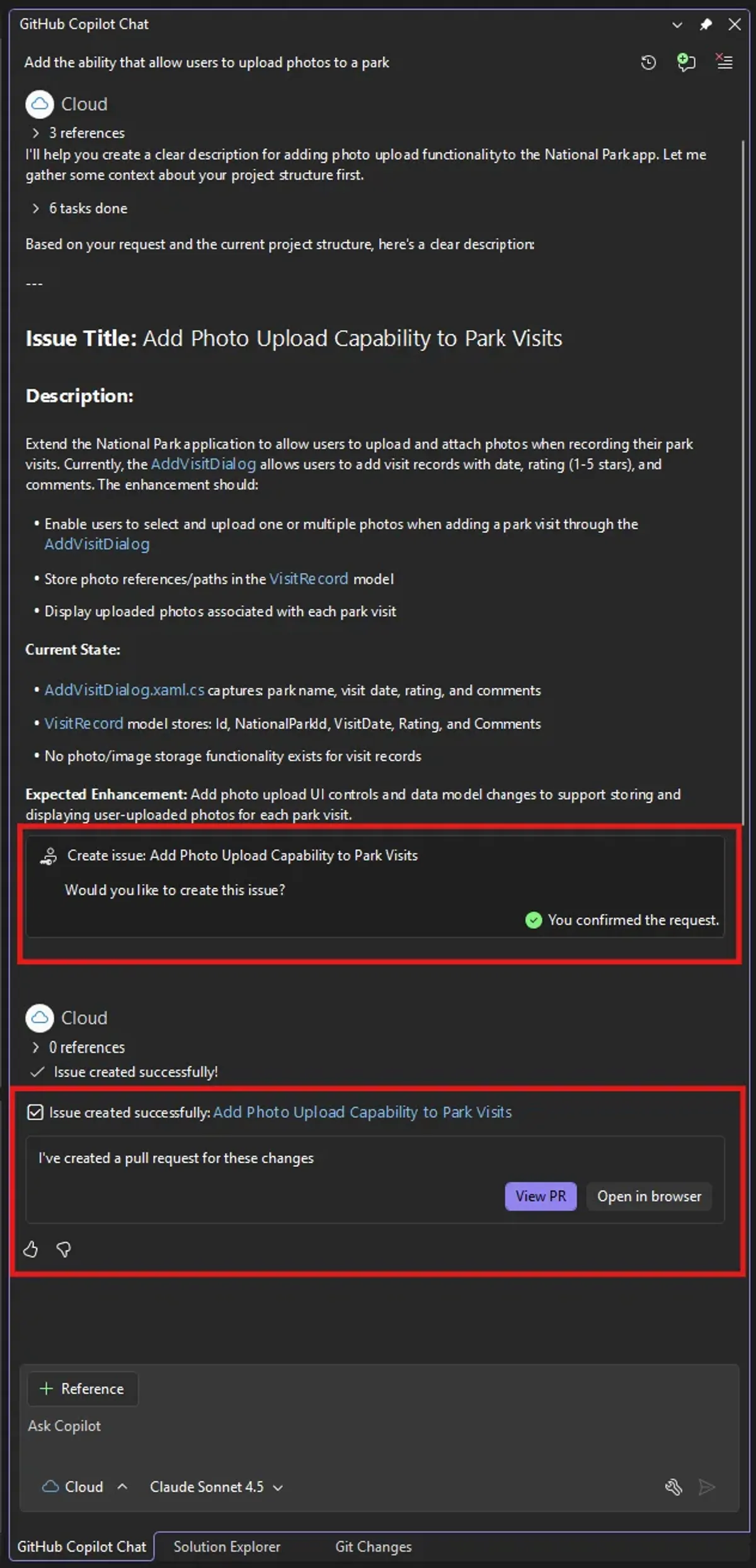
The workflow is straightforward. You open the agent chat panel, select “Cloud” from the agent picker, describe what you want done, and submit. The cloud agent creates a GitHub issue, spins up an isolated environment on GitHub Actions, clones the repository, does the work, and opens a pull request. You get a notification with a link. You don’t need to stay in the IDE while it runs.
What the Cloud Agent Is Good At
According to Microsoft, the cloud agent is suited for bounded, well-defined tasks: adding a feature, writing tests, fixing a bug with clear scope. It’s not designed for open-ended exploration or tasks that require your judgment in the loop.
The hard requirements: your project needs to be in a GitHub-hosted repository. Azure DevOps repos aren’t supported. You also need a Copilot Pro, Pro+, Business, or Enterprise subscription. The free Copilot tier doesn’t include cloud agent access.
Other Changes in This Update
User-level custom agents. Custom agents can now be stored in %USERPROFILE%/.github/agents/ so they travel with you across projects rather than being scoped to a single repository. This is useful for teams that want to define shared agent behaviors once rather than configuring them per-repo.
Debugger agent. A new debugger workflow starts from a GitHub or Azure DevOps issue, reproduces the bug, instruments the code, and suggests targeted fixes. Microsoft describes it as “debugging that works with you, not just for you.” The agent validates its proposed fix against live runtime behavior before presenting it.
C++ code editing tools GA. Support for C++ navigation through get_symbol_call_hierarchy and get_symbol_class_hierarchy is now generally available by default. These tools give the agent language-aware understanding of class inheritance and function call chains when refactoring C++ code.
IntelliSense priority. The editor now suppresses Copilot completions when IntelliSense is active, showing one suggestion at a time. Previously the two systems competed on screen.
Keyboard customization. You can now remap Copilot keyboard shortcuts through Tools > Options > Environment > Keyboard.
The Broader Picture
VS Code has had Copilot’s cloud agent since late 2025, and GitHub’s web interface added it earlier. Visual Studio being the last Microsoft IDE to get it isn’t a surprise, the VS team typically moves more slowly than the VS Code team given the IDE’s legacy .NET and C++ user base. But the gap is now closed.
For teams that are still on full Visual Studio, particularly enterprise shops running large C#, C++, or .NET desktop codebases, this update makes Copilot’s async agent accessible without switching editors. The requirement for GitHub-hosted repos will exclude some shops that are still on Azure DevOps or hosted TFS, but for GitHub-native enterprises, this is a real workflow change.
The full changelog is on the Visual Studio Blog and the GitHub Copilot changelog.
Sources: Visual Studio Blog — April 2026 Update, GitHub Copilot Visual Studio April Update, Visual Studio Magazine