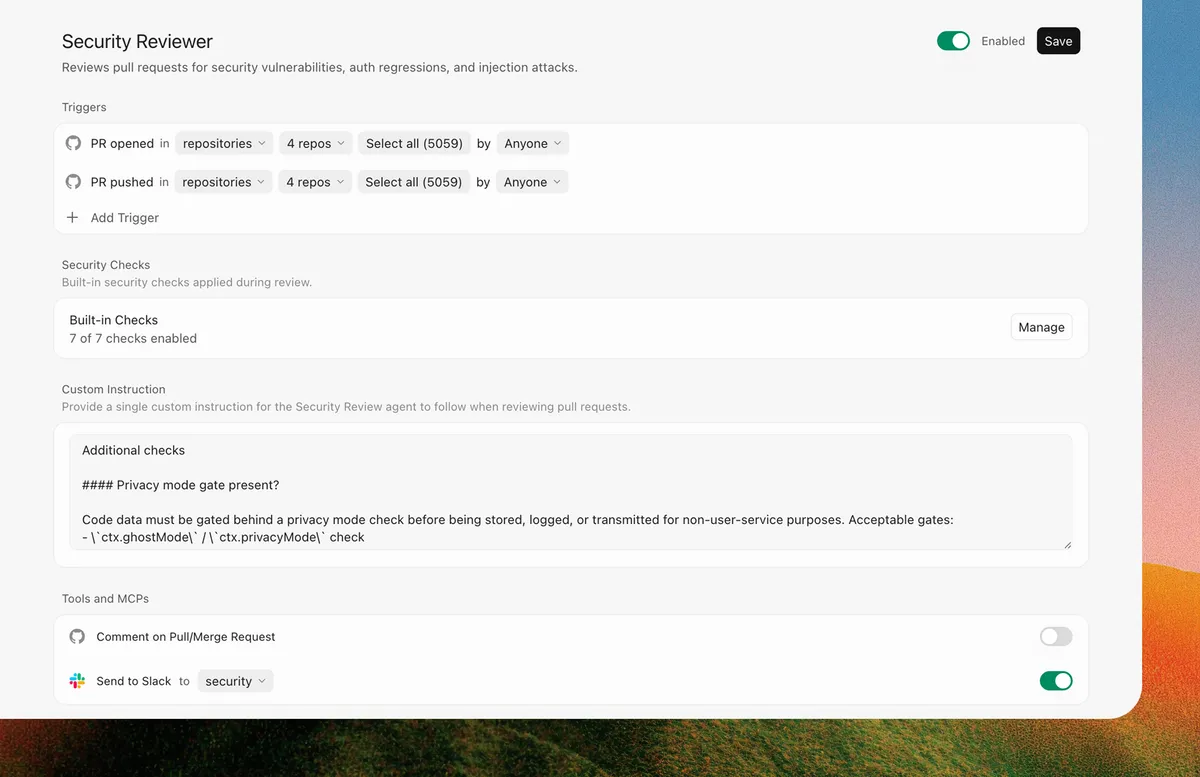
 Screenshot: Cursor
 Cursor Launches AI Security Review: Automated PR Scanning and Codebase Vulnerability Checks
Cursor Security Review enters beta on Teams and Enterprise plans with two always-on agents: a Security Reviewer that comments on every PR, and a Vulnerability Scanner that runs scheduled codebase sweeps.
Cursor shipped Security Review on April 30 as a beta feature for Teams and Enterprise plans. It adds two always-on security agents to your workflow: one that reviews pull requests, and one that sweeps your codebase on a schedule.
The announcement is notable because it marks Cursor moving beyond the code editor role into territory that dedicated security tooling like Snyk, Semgrep, and GitHub’s own code scanning have held. The difference here is that Cursor’s agents are built on top of the same model context that the editor already has about your codebase.
Security Reviewer
Security Reviewer runs on every PR. According to the changelog, it checks for:
- Security vulnerabilities
- Auth regressions
- Privacy and data-handling risks
- Agent tool auto-approvals (specifically relevant given how much AI-generated code now wires up tool permissions)
- Prompt injection attacks
It leaves inline comments at the exact diff location with a severity assessment and remediation guidance. That’s the same review format developers are used to from human reviewers or existing automated review tools.
The prompt injection check is the most interesting item on that list. As more code gets written by and for AI agents, prompt injection in prompts embedded in code (system message strings, tool descriptions, instruction files) is becoming a real attack surface. Having an automated reviewer specifically looking for it makes sense to add now.
Vulnerability Scanner
Vulnerability Scanner runs on a schedule rather than on every commit. It scans for:
- Known vulnerabilities in dependencies
- Outdated packages
- Configuration issues
You can configure it to post findings to Slack, which makes it more useful for teams where the security owner isn’t always watching the Cursor dashboard. It surfaces problems asynchronously rather than only when someone is actively working on the codebase.
Customization and Existing Tool Integration
Both agents are configurable. You can adjust when they trigger, add custom instructions, and connect them to your existing security tooling via MCP servers. The changelog specifically mentions SAST, SCA, and secrets scanners — meaning Cursor can act as an orchestration layer that calls out to tools you already pay for rather than replacing them.
Cursor draws from your existing usage pool for these agents, so there’s no separate quota. Admins enable the feature through the Cursor dashboard.
Context
This follows Cursor’s recent work on extending the editor into more of a development platform. The May 1 update also let team admins manage plugin marketplaces directly from the dashboard, with distribution modes (default off, default on, required) for controlling what tooling reaches developers.
Security Review is in beta, which means the behavior is likely to change as the team collects feedback. The Snyk analysis published this week notes gaps in the current implementation around complex vulnerability patterns and multi-file attack chains — worth reading if you’re evaluating whether this replaces your existing tooling or supplements it.
Sources: Cursor changelog (April 30), Cursor on X