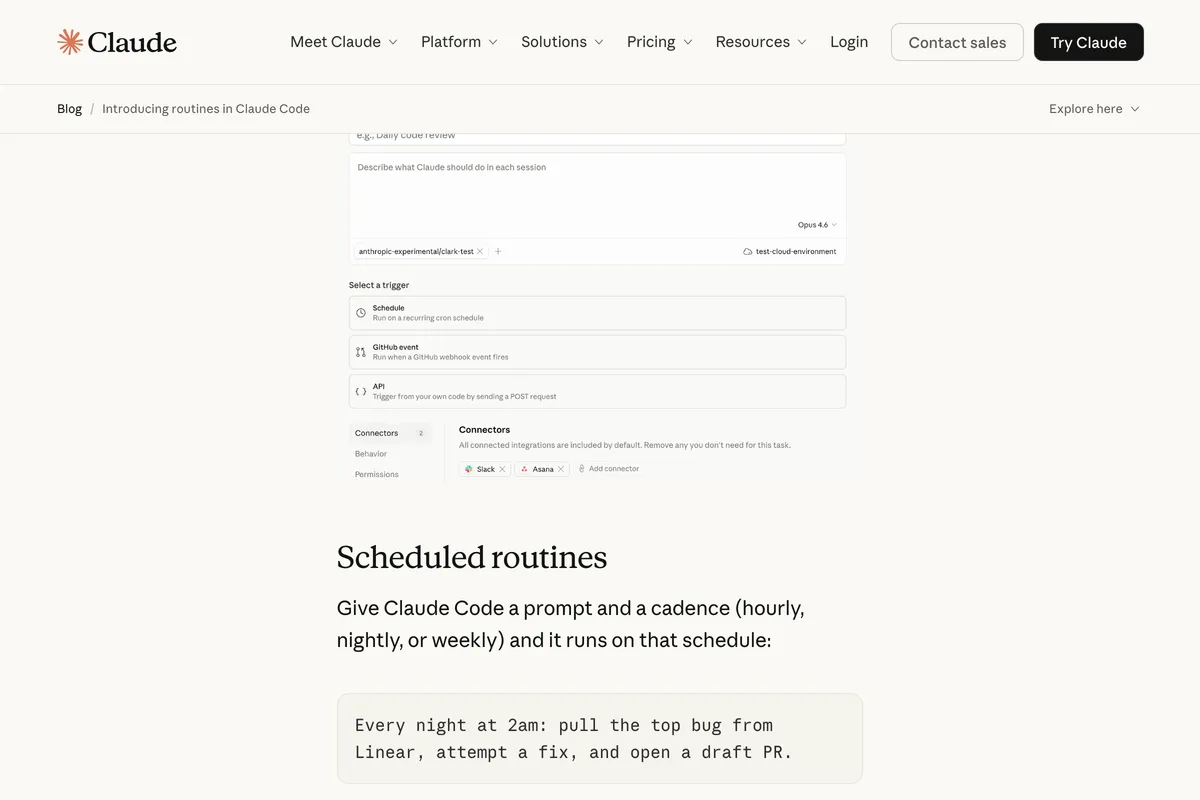
 Screenshot from claude.com/blog
 Claude Code Routines Turn Your AI Coding Agent Into a Background Worker
Anthropic launches Routines in Claude Code: repeatable automations that run on schedules, respond to API calls, or fire on GitHub events. No laptop required.
Anthropic just shipped the feature that turns Claude Code from a tool you use into a tool that works while you don’t. Routines, announced today as a research preview, let you configure an automation once and have it execute on a schedule, in response to an API call, or when something happens in a GitHub repo.
The critical detail: routines run on Anthropic’s cloud infrastructure. Your laptop can be closed. Your terminal can be off. The routine still fires, clones your repo, runs its prompt, and takes action.
What a Routine Actually Is
A routine packages three things together: a prompt (what Claude should do), one or more repositories (what it works on), and connectors via MCP (what external services it can reach). You configure it once, then it runs autonomously whenever its trigger condition is met.
This isn’t a session you babysit. Routines execute as full Claude Code cloud sessions with no permission prompts. They can run shell commands, use skills committed to the repo, and call any connected services. Actions carry your identity: commits use your GitHub credentials, Slack messages come from your linked account.
Each run clones the repo fresh from the default branch. Claude can push to claude/-prefixed branches by default, though that’s configurable.
Three Trigger Types
Routines support three trigger mechanisms, and you can combine multiple triggers on a single routine.
Scheduled
The simplest version. Give Claude Code a prompt and a cadence (hourly, daily, weekdays, or weekly), and it executes on that schedule. Custom cron expressions are supported via /schedule update. The minimum interval is one hour. Times use your local timezone.
The example from Anthropic’s announcement captures the idea well: “Every night at 2am: pull the top bug from Linear, attempt a fix, and open a draft PR.” That’s a nightly triage routine that works your backlog while you sleep.
Other scheduled use cases include weekly scans for documentation that’s drifted from the codebase, or daily dependency audits that flag outdated packages.
API
Every routine gets its own HTTP endpoint and authentication token. Send a POST request to https://api.anthropic.com/v1/claude_code/routines/{routine_id}/fire with a bearer token, and you get back a session ID and URL.
The POST body accepts an optional text field (up to 65,536 characters) for passing context, like an alert payload or a deployment log. This is where routines start to feel less like a cron job and more like glue between your existing systems.
Wire it into your alerting pipeline: when PagerDuty fires, POST the alert body to a routine that correlates the error with recent commits and posts a triage summary to Slack. Hook it into your CD pipeline: after a deploy completes, trigger a routine that scans error logs and opens an issue if something looks wrong.
Authentication uses per-routine bearer tokens (prefixed sk-ant-oat01-), scoped to that single routine. No broader API access. The endpoint requires a beta header (experimental-cc-routine-2026-04-01) since this is still a research preview.
GitHub Webhooks
Subscribe a routine to GitHub repository events via the Claude GitHub App. When a matching event fires, Claude creates a new session for it and runs the routine’s prompt.
The event coverage is broad: 17 categories including pull requests, pushes, issues, releases, check runs, workflow runs, discussions, and merge queue entries. PR triggers come with granular filters for author, title, body, base and head branch, labels, draft status, merge status, and whether the PR comes from a fork.
Each matching event gets its own session. If three PRs open in quick succession, three independent routine sessions spin up and run concurrently.
The obvious use case: bespoke code review. When a PR opens, Claude runs your team’s specific review checklist against the diff and posts findings. Or library porting, where a merged PR in one SDK triggers an automatic port to a parallel SDK repo.
How This Relates to /schedule and /loop
If you’ve been using /schedule in the Claude Code CLI, your existing scheduled tasks are now scheduled routines. The command still works the same way; it just creates routines on the cloud backend.
/loop remains a separate, local feature. It runs in your active terminal session, requires your machine to be on, polls at intervals as short as one minute, and expires after seven days. Think of /loop as “watch this thing while I’m here” and routines as “handle this thing whether I’m here or not.”
Desktop scheduled tasks (via the Claude Code Desktop app) also remain as a separate local option that requires your machine to be running.
The hierarchy is clear:
| Routines (Cloud) | Desktop Tasks | /loop | |
|---|---|---|---|
| Runs on | Anthropic cloud | Your machine | Your machine |
| Machine required | No | Yes | Yes |
| Open session required | No | No | Yes |
| Survives restarts | Yes | Yes | No |
| Local file access | No (fresh clone) | Yes | Yes |
| Minimum interval | 1 hour | 1 minute | 1 minute |
Limits and Pricing
Routines are available on Pro, Max, Team, and Enterprise plans for users with web-based Claude Code enabled. Daily run limits:
- Pro: 5 routine runs per day
- Max: 15 routine runs per day
- Team/Enterprise: 25 routine runs per day
Each routine run draws from your subscription usage in the same way an interactive session does. Organizations with extra usage enabled can exceed the daily caps on metered overage. GitHub webhook events have additional per-routine and per-account hourly caps during the research preview.
Given the ongoing concerns about Claude Code token consumption, the usage impact is worth watching. Each routine clones a fresh repo and starts a new session, which means no cache reuse between runs. For teams on Max plans already hitting usage limits during interactive work, adding 15 daily routine runs could burn through quota meaningfully faster.
Where This Fits in the Market
Anthropic isn’t the first to ship cloud-based background agents. Cursor’s Background Agents run in cloud VMs and generate PRs autonomously. Codex has codex cloud exec for cloud-delegated tasks in sandboxed containers. GitHub Copilot uses the & prefix for background cloud delegation.
What none of those offer is the combined trigger model. A single Cursor Background Agent can’t be scheduled AND respond to GitHub webhooks AND accept API calls. Routines can. That API trigger in particular opens a category of automation that the other tools don’t address: connecting your existing infrastructure (monitoring, CI/CD, incident management) directly to an AI coding agent that can take action.
The 17 GitHub event categories with granular PR filters also go deeper than what competitors support. Copilot’s coding agent responds to issues assigned to it. Routines respond to pushes, releases, check runs, workflow completions, discussions, and merge queue events, each with configurable filters.
What to Watch
This is a research preview. Anthropic is explicit that “behavior, limits, and the API surface may change.” The beta header requirement and the sk-ant-oat01- token prefix both signal that the API contract isn’t final. Breaking changes will ship behind new dated header versions, with the two most recent previous versions continuing to work.
The meaningful open questions are about trust and control. Routines run autonomously with no permission prompts. They push code under your GitHub identity. They post to Slack as you. The claude/-prefixed branch restriction provides a guardrail for git operations, but connected services like Slack or Linear have no equivalent scoping.
For teams evaluating this: start with read-only routines (triage, review, reporting) before graduating to routines that push code or modify external systems. The five-run daily cap on Pro plans is a natural forcing function for starting small.
You can create routines from three places: the web UI at claude.ai/code/routines, the Desktop app (New task > New remote task), or the CLI via /schedule.
Sources: