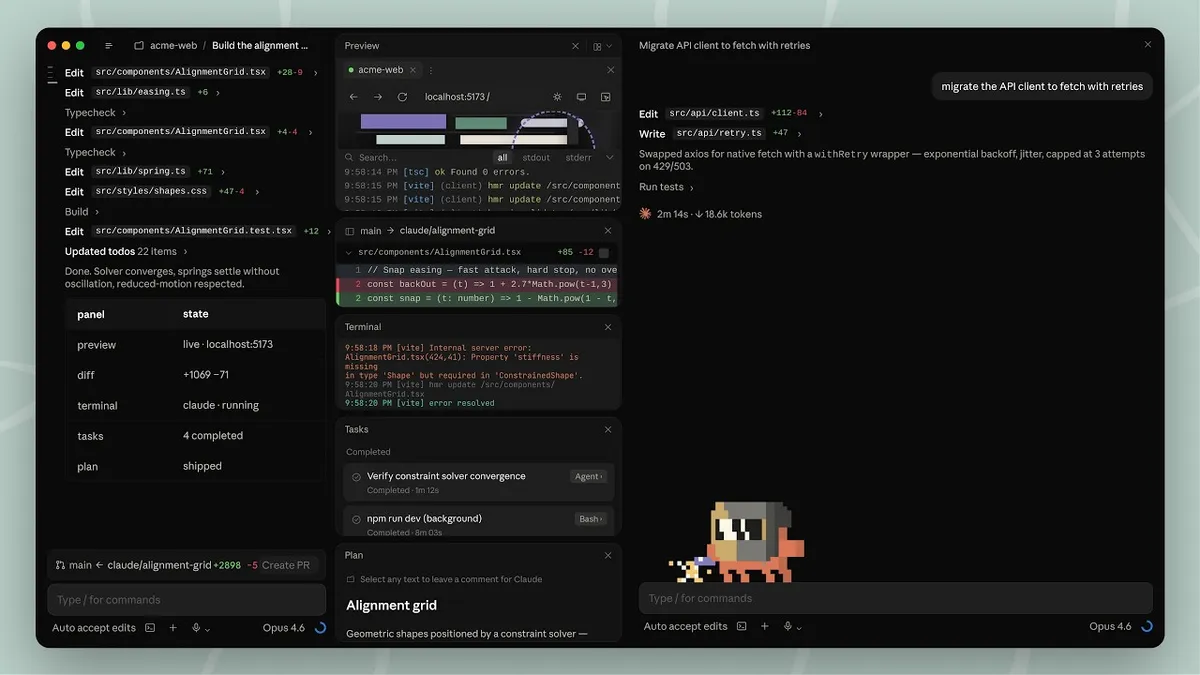
 Screenshot from Anthropic's announcement video
 Claude Code's Desktop App Just Got a Complete Redesign Built Around Parallel Agents
Anthropic rebuilds the Claude Code desktop from scratch with a session sidebar, drag-and-drop panels, integrated terminal, file editor, and live preview. The old single-session window is gone.
Anthropic shipped a full redesign of the Claude Code desktop app today, and it looks nothing like the old version. The single-session chat window is gone. In its place: a multi-panel workspace where you run parallel coding sessions, review diffs, watch a live preview, use an integrated terminal, and edit files, all in one window with a drag-and-drop layout you can arrange however you want.
The redesign reflects how people actually use Claude Code in 2026. You don’t run one agent on one task anymore. You kick off three or four sessions across different repos, check on them as results come in, steer the ones that need steering, and merge the ones that are ready. The old app wasn’t built for that workflow. This one is.
The New Layout
The most visible change is the session sidebar on the left side of the window. Every active and recent session lives here. You can filter by status (active vs. archived), by project, or by environment (local, cloud, SSH). Group sessions by project to find the one you need fast. When a session’s PR merges or closes, it archives itself automatically so the sidebar stays focused on what’s live.
The main workspace is a drag-and-drop grid of panels. Every built-in tool gets its own pane that you can position wherever it makes sense for your workflow:
- Integrated terminal for running tests, builds, or arbitrary commands alongside your session
- In-app file editor for opening files, making spot edits, and saving directly without leaving the app
- Faster diff viewer, rebuilt for performance on large changesets, with inline commenting (click any line, Cmd+Enter to submit all comments)
- Expanded preview pane that opens HTML files, PDFs, and local app servers in-app
Arrange the terminal below the chat, the diff viewer on the right, the preview pane on top. Whatever makes sense for the task you’re doing. The layout is fluid, not fixed.
Parallel Sessions With Worktree Isolation
The “parallel agents” in the headline isn’t marketing language. You can spin up multiple sessions from the sidebar, each working on a different task in the same repo or across different repos. Each session gets its own isolated Git worktree, so one agent’s changes don’t collide with another’s. Worktrees are stored in <project-root>/.claude/worktrees/ by default, configurable in settings.
This is the feature that changes how the desktop app feels in practice. With the old single-session window, running parallel agents meant opening multiple windows and mentally tracking which window was doing what. Now it’s one window, one sidebar, instant context-switching.
Side chat (Cmd+; or Ctrl+;) lets you ask Claude a question mid-task without derailing the main conversation thread. Side chats pull context from the main thread but don’t add anything back to it. It’s a branch, not an interrupt.
Built-In Dev Tools
Before this redesign, using Claude Code on desktop meant bouncing between the app and your editor, the app and your terminal, the app and your browser. The integrated tools eliminate most of that switching.
The terminal is useful for the obvious reasons: running tests to verify Claude’s work, checking build output, or tailing logs while a session runs. It’s not a full terminal emulator replacement, but it handles the common cases where you’d otherwise Cmd+Tab to iTerm.
The file editor is for quick spot edits. If Claude changed a variable name you don’t like or left a TODO you want to fill in, you can fix it in-app instead of opening VS Code. It’s not trying to replace your editor for serious work.
The diff viewer rebuild is about speed. The old viewer struggled on large changesets. The new one handles them without hitching. Inline commenting (click any line to add a note, Cmd+Enter to submit all at once) tightens the review loop: you look at the diff, mark what you want changed, and Claude processes all your comments in one pass.
The preview pane has been expanded beyond dev servers. It now opens static HTML files and PDFs directly, on top of the existing live app preview where Claude starts your dev server and auto-verifies its own changes by taking screenshots, inspecting the DOM, and clicking through the UI.
Three View Modes
The redesign adds three view modes that control how much of Claude’s internal process you see:
- Verbose: Full transparency. Every tool call, every reasoning step.
- Normal: Balanced view. The default.
- Summary: Just the results. Minimal process detail.
This addresses a real tension in the old UI. Some developers want to watch everything Claude does. Others find the tool call spam distracting and just want to see what changed. Now you can choose.
SSH on Mac, Finally
SSH sessions were previously Linux-only. The redesign extends SSH support to macOS, so you can point Claude Code at remote machines, cloud VMs, or dev containers from your Mac. Configure a connection (name, host, port, identity file) in settings and Claude Code runs on the remote machine.
Sessions can also run locally or in the cloud on Anthropic’s infrastructure. Cloud sessions persist when your laptop is closed and can be monitored from claude.ai/code or the iOS app.
Keyboard Shortcuts and Customization
New keyboard shortcuts cover session switching, spawning new sessions, and navigation. Press Cmd+/ (or Ctrl+/) to see the full list. A new usage button in the interface shows both your context window consumption and session-level metrics at a glance.
Under the hood, the app has been rebuilt for reliability and speed. Responses now stream in real-time rather than arriving in chunks, which makes long-running sessions feel noticeably more responsive.
Plugin and Connector Parity
The desktop app now has full parity with the CLI for plugins and skills. Both centrally-managed and locally-installed plugins work. Connectors for GitHub, Slack, Linear, Notion, Google Calendar, and other services are available for local and SSH sessions.
This matters for teams that have invested in custom skills or MCP server configurations. Everything you’ve set up in the CLI carries over to the desktop, and vice versa. CLAUDE.md files, hooks, and settings are shared between the two.
What Desktop Still Doesn’t Do
The docs are transparent about gaps. The desktop app does not support:
- Third-party LLM providers (Bedrock, Vertex, Foundry). CLI only.
- Linux. Mac and Windows only.
- Inline code suggestions. This is a chat-based agent, not a tab-complete copilot.
- Agent teams. The CLI’s multi-agent orchestration feature isn’t in the desktop yet.
That last one is notable. Agent teams, where Claude spawns sub-agents that coordinate on different parts of a task, is one of the most powerful Claude Code CLI features. Its absence from the desktop is a gap worth watching.
The Epitaxy Connection
If you’ve been following the leaks, some of this will feel familiar. Back in late March, TestingCatalog reported on an unreleased Claude Code mode internally codenamed Epitaxy that had surfaced in the accidentally leaked source code. Epitaxy was described as having a Cowork-style layout with dedicated panels for Plans, Tasks, and Diffs, multi-repo support, and an expanded hotkey system.
The redesign that shipped today matches those descriptions closely. The drag-and-drop panels, the task and plan panels visible in the announcement video, the multi-repo parallel sessions, the new keyboard shortcuts. Anthropic hasn’t confirmed the codename, but the feature overlap between what was leaked as Epitaxy and what launched today is nearly complete.
How This Compares to the Competition
The redesign puts Claude Code’s desktop in direct competition with the workspace-style coding tools that have been gaining ground:
Cursor already has a multi-panel IDE layout, because it is an IDE. Cursor’s strength is inline code suggestions and tight editor integration. Claude Code’s desktop isn’t trying to be an editor. It’s trying to be a control center for agents that happen to also have an editor, terminal, and preview built in.
Codex has its own desktop app with a code-focused interface. Codex’s approach is task delegation: you describe what you want, Codex works in a sandboxed cloud environment, and you review the result. Claude Code’s desktop gives you more direct control and visibility into what the agent is doing, at the cost of more decisions to make.
Windsurf (Cognition’s IDE) and VS Code with Copilot represent the “AI inside your editor” approach. Claude Code’s desktop takes the opposite stance: your editor is inside the AI. Whether that’s better depends on whether you think of the agent as a tool inside your workflow or your workflow as something the agent runs.
The parallel session management is where Claude Code’s desktop currently has the clearest edge. None of the competitors make it as easy to run, monitor, and switch between multiple independent agent sessions in a single window.
Availability
The redesigned desktop is available now on macOS and Windows for Pro, Max, Team, Enterprise, and Claude API plan users. Download from claude.ai or install via curl -fsSL https://claude.ai/install | sh for the CLI. Move CLI sessions to the desktop with the /desktop command.
There’s also an announcement video on YouTube walking through the new features if you want to see the layout in motion before downloading.
Sources:
- Redesigning Claude Code on desktop for parallel agents - Anthropic
- Claude Code Desktop Documentation
- Claude Code Changelog - v2.1.108
- Anthropic adds repeatable routines feature to Claude Code - 9to5Mac
- TestingCatalog: Anthropic tests new Claude Code desktop UI amid source code leak
- TestingCatalog: Anthropic tests Claude Code upgrade to rival Codex superapp