 Image: Zed / github.com/zed-industries
 Zed 1.12.0: Staged and Unstaged Git Views, Multi-Select Finders, and TypeScript 7 Support
Zed's 1.12.0 stable release ships a redesigned Git Panel with separate staged and unstaged sections, multi-select for the File and Text Finders, CSV row filtering, and a fix for TypeScript 7 language server breakage.
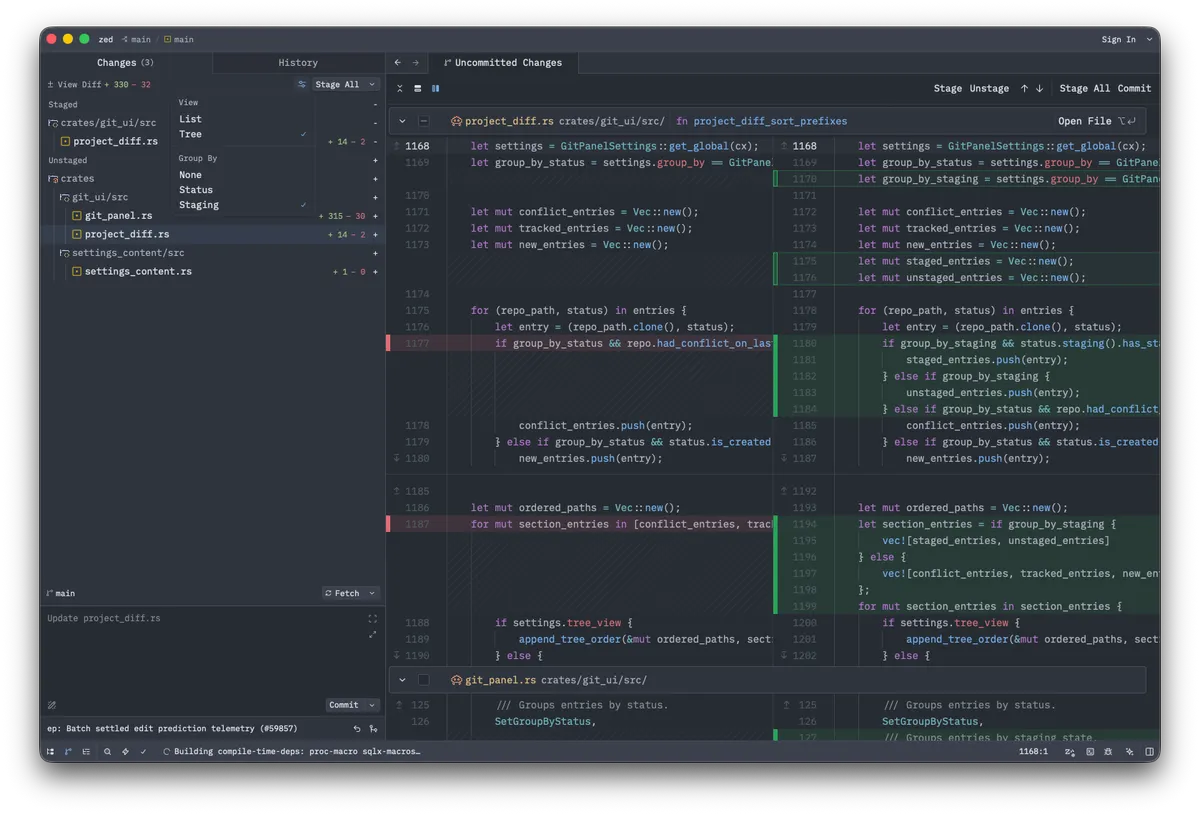
Zed 1.12.0 landed today as a stable release. The headline feature is a redesigned Git Panel with dedicated Staged and Unstaged sections — a workflow overhaul that’s been in preview since 1.11 and now reaches everyone on stable.
Git Panel Gets a Proper Staging View
The Git Panel previously showed all changed files in one list. In 1.12.0, files split into Staged and Unstaged groups, each with controls to stage or unstage individual changes. You also get Restore and Restore All buttons in the unstaged diff view for discarding changes you don’t want.
GPG passphrase prompts for commit signing now appear directly inside Zed rather than popping up a system dialog — a small but annoying friction point removed. Tags show up in Git blame tooltips, and the History tab in Git Graph gains a context menu.
Multi-Select in File and Text Finders
The File Finder and Text Finder now support multi-select. On macOS, cmd-click selects additional items; on Linux and Windows, ctrl-click. You can also press Tab to add items and then Enter to open them all at once. There’s a multi-select button in the search bar and keyboard shortcuts (cmd-shift-s on macOS, ctrl-shift-s elsewhere) to trigger it.
This is useful when you want to open several files from a search result without hunting through the picker multiple times.
Go-to-Definition Gets Filterable Previews
The three most common LSP navigation actions — Find All References, Go to Definition, and Go to Implementation — now open in filterable result pickers with file previews. You can configure the behavior globally with lsp_results_location or override it per action with open_results_in.
CSV Row Filtering
CSV files can now be filtered by row in the preview panel. Not flashy, but useful if you’re working with data files and don’t want to scroll through hundreds of rows to find what you need.
AI and Model Updates
ACP elicitations are now enabled by default, which lets ACP agents collect structured input from you mid-task. Custom Anthropic model configurations support a new "mode": { "type": "adaptive" } setting for adaptive thinking, plus a supports_fast_mode flag.
On the model side: GPT-5.6 Luna, Terra, and Sol join the OpenCode Zen and Amazon Bedrock providers. Grok 4.5 is also now available through OpenCode Zen. GPT-5.6 Luna specifically gets ChatGPT subscription support.
In-progress MCP tool calls can now be expanded to see what’s happening while an agent runs.
TypeScript 7 Fix
TypeScript 7 broke the typescript-language-server that Zed uses. This release patches the breakage. If you’ve already upgraded to TypeScript 7, you can also install the tsgo extension to use TypeScript’s native language server, which avoids the wrapper entirely.
Other Changes
A few other things worth knowing about:
format_on_savegets two new modes:modificationsandmodifications_if_available, which format only Git-changed lines instead of the whole file. This prevents diffs from getting polluted with whitespace changes in legacy codebases.workspace: toggle editor zoommaximizes the active editor pane while keeping panels visible.- Markdown files now support pasting clipboard images directly.
cmd-shift-v(macOS) orctrl-shift-v(Linux/Windows) toggles between a Markdown file and its preview.- GLSL and WGSL comment-label syntax injection works in JavaScript and TypeScript template literals.
- Gitignored subdirectories can be opened as separate workspaces.
The release also fixes about 50 bugs, including agent indentation corruption when edits omitted leading whitespace, terminal jitter on vertical resize, and Wayland clipboard breakage after many IME commits.
Full release notes are at zed.dev/releases/stable/1.12.0.