 Image: Microsoft / code.visualstudio.com
 VS Code 1.135 Lets You Resume Agent Sessions From Other Apps and See Token Costs Per Model
The August 26 VS Code release adds cross-app agent session continuity, an experimental rubber-duck second-opinion command, and per-model token usage breakdowns in chat.
VS Code 1.135 shipped on August 26 with a handful of changes to how agent sessions work — across apps, across windows, and in terms of how visible they are about what they’re spending.
Cross-App Session Continuity
The Agents window now shows recent Copilot or Claude agent sessions created in other applications. Start a session in the Claude desktop app or in GitHub’s web interface, and you can pick it up in VS Code without losing context. You can also connect to the same agent session from multiple VS Code windows via the Agent Host.
This is the kind of thing that seems obvious in hindsight: the Agent Host Protocol exists precisely so that sessions aren’t tied to one client, but earlier releases didn’t surface that capability in a way that was easy to use. Now you can treat your agent sessions more like tabs — open them anywhere.
Rubber Duck Debugging (Experimental)
There’s a new /rubber-duck command that asks a complementary model to review what your primary agent has been doing and surface missed details or edge cases. The idea is that the second model comes in fresh, without the context accumulation bias of the session so far, and may notice things your main agent reasoned past.
It’s experimental and opt-in. Whether it’s useful in practice depends a lot on the task — for code review or complex multi-step problems it seems like it could catch real things, for quick scripting tasks it’s probably noise. Worth trying on a long session where you’re not sure the agent is heading the right direction.
Per-Model Token Usage
Chat responses now show a detailed token breakdown on hover: input tokens, cached input tokens, and output tokens, separated by model. This is genuinely useful if you’re running sessions that switch between Anthropic subscription models and Copilot-billed models at different points, since the costs land in different buckets.
The redesigned response footer also includes sticky scroll — the current prompt stays visible while you scroll through long agent output — and a conversation search with case matching and regex support.
Streamlined Agents Window
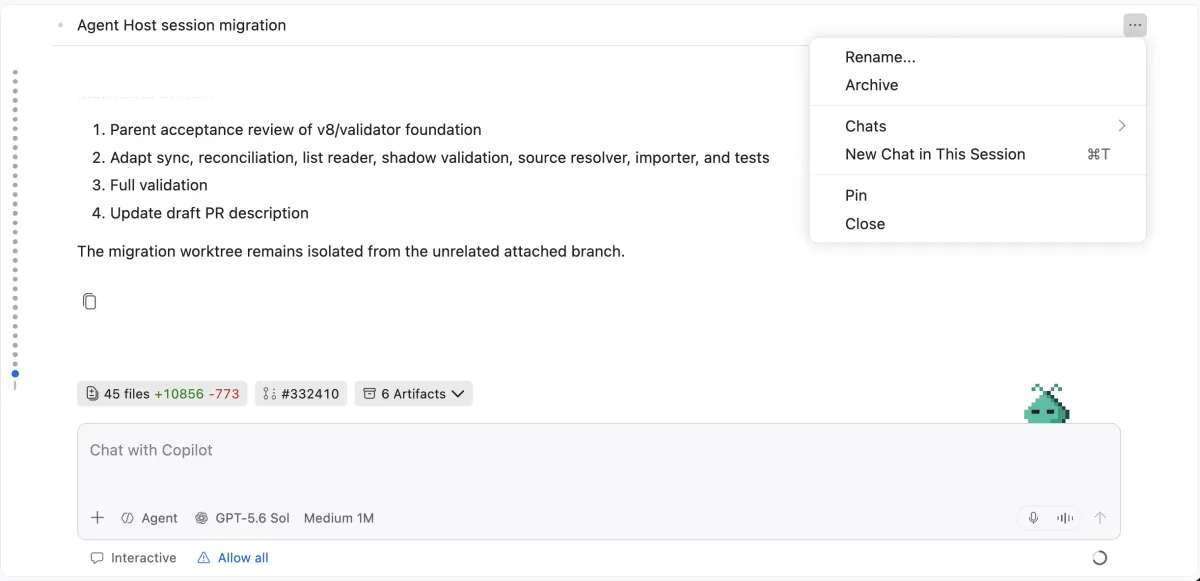
The Agents window has a new single-pane layout by default. Session headers are simplified with title-forward design and overflow menus. Information pills above the chat input show changes, PRs, issues, and artifacts associated with the session. You can configure which pills are visible from a context menu.
The Agent Host also now lets you use the Agents window with a Claude API key without signing into GitHub — useful if you have an Anthropic subscription and want Claude in VS Code without routing through Copilot billing.
Other Changes
The integrated browser gets element-level annotation — you can select specific HTML elements on a page and attach comments to them, which the agent can then act on. Auto-reload keeps browser previews in sync with file saves.
Dictation now runs on a multilingual on-device model by default, keeping audio local. You can configure cleanup rules at the workspace level for project-specific terminology, and terminal dictation preserves command syntax rather than inserting spoken punctuation.
The full release notes are at code.visualstudio.com.