 Google Developers Blog
 Google Releases Colab CLI: Run Python on Cloud GPUs From Your Terminal
Google open-sourced the Colab CLI on June 5, letting developers and AI agents provision A100s and H100s, run Python scripts, and download results without touching a browser. A bundled COLAB_SKILL.md makes it ready for Claude Code, Codex, Gemini CLI, and other terminal agents out of the box.
Google released the Colab CLI on June 5. The source is on GitHub under Apache 2.0. The blog post is from the Google Developers team.
The short version: you can now spin up a T4, L4, A100, or H100 from your terminal, run a Python script against it, pull the results back, and shut it down — without opening a browser tab. Colab notebooks are optional. The CLI is its own interface.
It runs on Linux and macOS. Windows is not supported.
How It Works
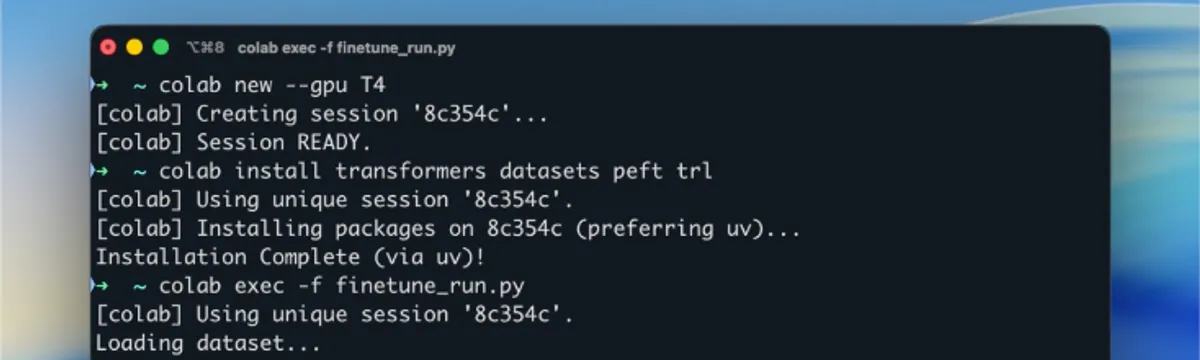
The session model is straightforward. A colab new command provisions a VM with a Jupyter kernel running on it. That session stays alive as long as you’re working with it. Commands you run against it share state: if you install a package, it’s available for the next script you run in the same session.
colab new -s trainer --gpu A100
colab install -s trainer torch transformers
colab exec -s trainer -f train.py
colab download -s trainer checkpoints/model.bin ./model.bin
colab stop -s trainer
The CLI includes a background daemon that sends keep-alive signals to the VM, so you don’t lose your session to idle timeouts while you’re not actively running commands.
The full accelerator list: T4, L4, G4, A100, H100 for GPUs, and v5e1 and v6e1 for TPUs. CPU is the default with no flag.
Commands Worth Knowing
Session setup:
colab new [-s NAME] [--gpu GPU]— provision a VMcolab sessions— list what’s runningcolab stop [-s NAME]— terminate and release the VM (don’t skip this)
Code execution:
colab exec [-s NAME] -f script.py— run a script against a live sessioncolab run [--gpu GPU] SCRIPT— one-shot ephemeral run (provisions, runs, cleans up in one command)
File operations:
colab upload,colab download,colab ls,colab rm,colab edit
Logging:
colab log [-s NAME] --output results.ipynb— export session history as a notebook, markdown, text, or JSONL
The repl and console commands exist but require a real TTY, so they’re not useful in scripts or agent pipelines.
The Agent Compatibility Layer
The repo includes a COLAB_SKILL.md file at the root. This is a context document structured for AI agents — Claude Code, Codex, Gemini CLI, or any other tool that can load skill or context files. It explains the session model, the safe commands for agent use, the authentication approach (Application Default Credentials via --auth=adc), and the warning to always run colab stop at the end to avoid burning compute credits.
The practical effect: you can hand an agent a task like “fine-tune this model on this dataset and download the checkpoint” and the agent has enough context about the CLI to do it correctly without needing to figure out the Colab API from scratch.
Google demoed a workflow in the blog post: fine-tuning Gemma 3-1B using QLoRA on a Text-to-SQL dataset, from session provisioning to checkpoint download, without leaving the terminal.
Installation
uv tool install google-colab-cli
# or
pip install google-colab-cli
You’ll need to authenticate with Google on first use. The CLI supports OAuth2 and Application Default Credentials.
The Apache 2.0 license means you can use this in commercial projects, build on top of it, or modify it. The GitHub repo has the full documentation and COLAB_SKILL.md.