 Image: GitHub
 GitHub Copilot Can Now Fix Merge Conflicts Directly on GitHub.com
A new 'Fix with Copilot' button on pull request pages lets the Copilot cloud agent resolve merge conflicts, run CI checks, and push — all without touching your local environment.
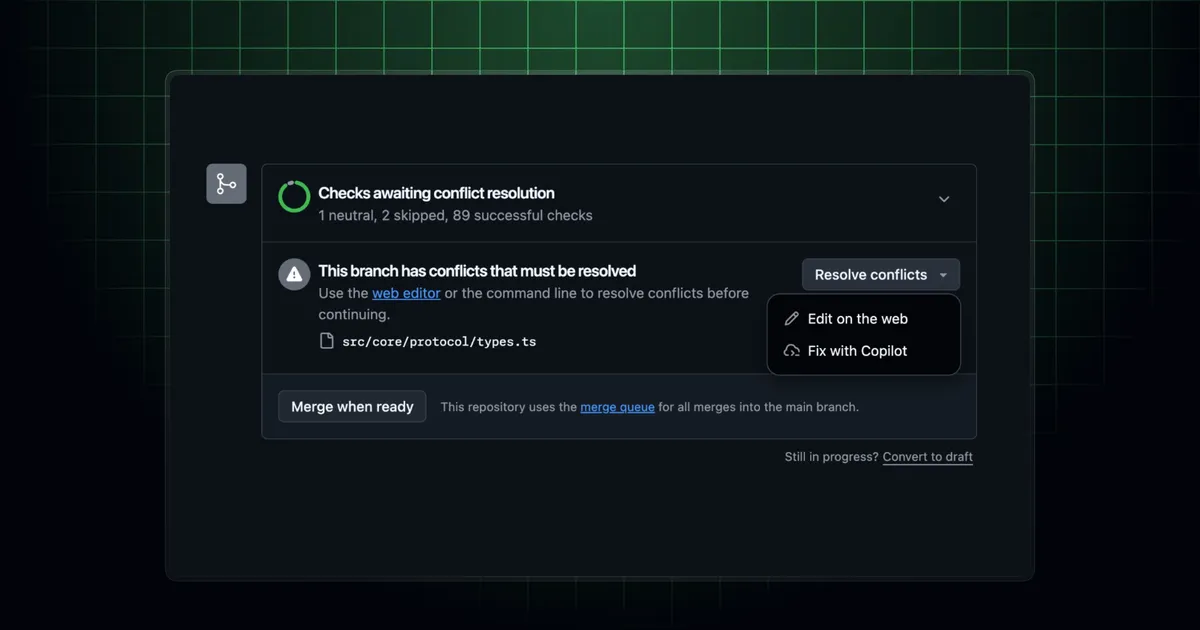
GitHub added a “Fix with Copilot” button to pull request pages on github.com on April 13. When a PR has merge conflicts, clicking it hands the resolution off to the Copilot cloud agent, which fixes the conflicts, verifies that the build and tests still pass, and pushes the result — all from its own cloud environment.
The feature is part of Copilot’s expanding cloud agent capabilities. The same agent can be directed to fix failing tests, address code review comments, or make other PR-level changes through @copilot mentions in comments.
How It Works
The flow is straightforward:
- Open a pull request with merge conflicts on github.com
- Click “Fix with Copilot” — a prepopulated comment appears requesting conflict resolution
- Submit the comment and Copilot’s cloud agent takes over
The agent resolves the conflicts in its own virtual environment, runs the CI checks, and pushes once tests pass. You don’t need to pull the branch locally, resolve conflicts manually, or push back up. The whole process happens server-side.
Alternatively, you can skip the button and use @copilot directly in a PR comment with whatever instruction you need: “@copilot Merge in main and resolve the conflicts” or more specific instructions if the conflict involves code the agent needs context on.
What It Replaces
Merge conflict resolution is one of the consistently annoying parts of maintaining a PR. The typical flow: pull the base branch locally, resolve conflicts in your editor, confirm nothing broke, push. For simple conflicts, that’s five to ten minutes of interruption for something mechanical. For complex ones, it’s longer.
Moving this to the cloud agent means that routine case, where the conflicts are deterministic and the tests are a reasonable proxy for correctness, can happen without you touching it. You review the result rather than doing the work.
Availability
The Copilot cloud agent is included in all paid Copilot plans. Copilot Business and Enterprise users need their administrator to enable the cloud agent before it’s available to the team. Once enabled, the “Fix with Copilot” button appears on any PR with active merge conflicts.
GitHub’s documentation covers the full set of things you can ask @copilot to do on existing pull requests.
Source: GitHub Changelog, April 13, 2026.