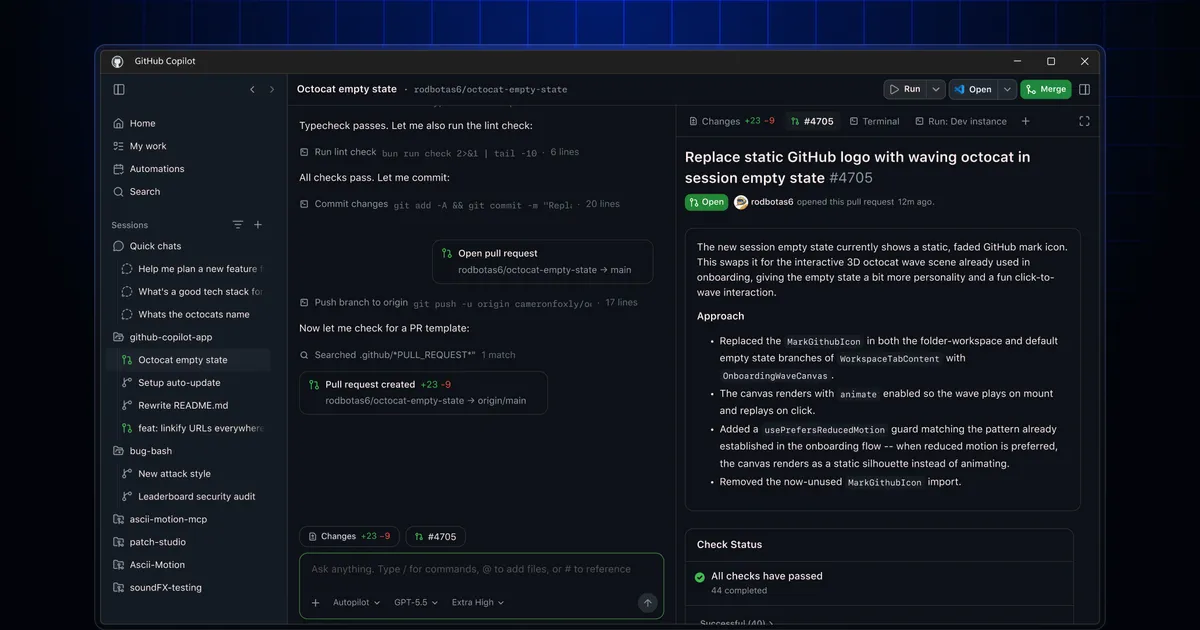
 Screenshot from GitHub Blog / github.blog
 GitHub Copilot App Opens to All Paid Plans With Canvases, Voice, and Cloud Automations
The GitHub Copilot App technical preview expanded to all Copilot Pro, Pro+, Business, and Enterprise customers on June 2. Headline additions include Canvases for bidirectional agent work, on-device voice, cloud sessions, and recurring automations that run without your machine.
GitHub expanded access to its Copilot App technical preview on June 2, opening it to all paid plan holders after a limited release in mid-May. Copilot Pro, Pro+, Business, and Enterprise customers can now use it. Free-tier users can join a waitlist.
The Copilot App is separate from the Copilot extension inside VS Code or JetBrains. It’s a standalone desktop application designed around agent workflows rather than inline suggestions, and this week’s update brings its most notable feature yet: Canvases.
Canvases
Canvases are bidirectional work surfaces. The idea is that instead of watching an agent output text in a chat panel, you get a structured object, a plan, a pull request, a checklist, a migration board, a spreadsheet, a cloud console, that both you and the agent can edit at the same time.
The agent updates the canvas as it works. You can edit, reorder, or redirect work directly on the same surface. The result is closer to a shared document than a chat log. You’re not watching the agent run; you’re working alongside it on the same artifact.
That’s a meaningful shift from how most coding agents present work today, which is usually a transcript of what happened rather than something you can interact with mid-run.
Voice
Voice conversations are live in the app with on-device speech-to-text. No audio leaves your machine. The implementation uses the same technology as Copilot CLI. You can describe a task or redirect the agent without typing.
Cloud Sessions and Automations
Two features make the Copilot App more useful when you’re away from your machine.
Cloud Sessions let you start an agent session that runs in the cloud rather than locally. You don’t need your computer to stay on or connected. You can kick off a session, close the laptop, and check back later.
Cloud Automations go further: you can schedule recurring tasks that run without your machine being awake. GitHub hasn’t detailed the scheduling interface yet, but the concept is close to a cron job, something runs on a timer and produces a result without you being present.
Other Additions
A few smaller features also shipped with the expanded preview. Copilot CLI is now integrated into the app’s work view so you don’t need a separate terminal window open. Agentic browser control lets the agent verify UI changes by actually operating a browser. There’s a “Rubber duck” skill for thinking through problems out loud, and a /chronicle command for querying session history.
Model selection is per-session. MCP server support and reusable skills carry over from the earlier limited preview.
Context
The Copilot App was first announced alongside Project Polaris at Microsoft Build 2026 in mid-May. Polaris is GitHub’s effort to give Copilot persistent memory and long-running reasoning capabilities. The App is where some of that plays out in practice.
The initial May 14 technical preview was limited to a small group. Expanding to all paid plans this week is the first time most Copilot customers have had access. GitHub hasn’t announced a general availability date.
Source: GitHub Changelog, June 2, 2026