 Image: GitHub / github.blog
 GitHub Copilot CLI's Redesigned Terminal Interface Is Now Generally Available
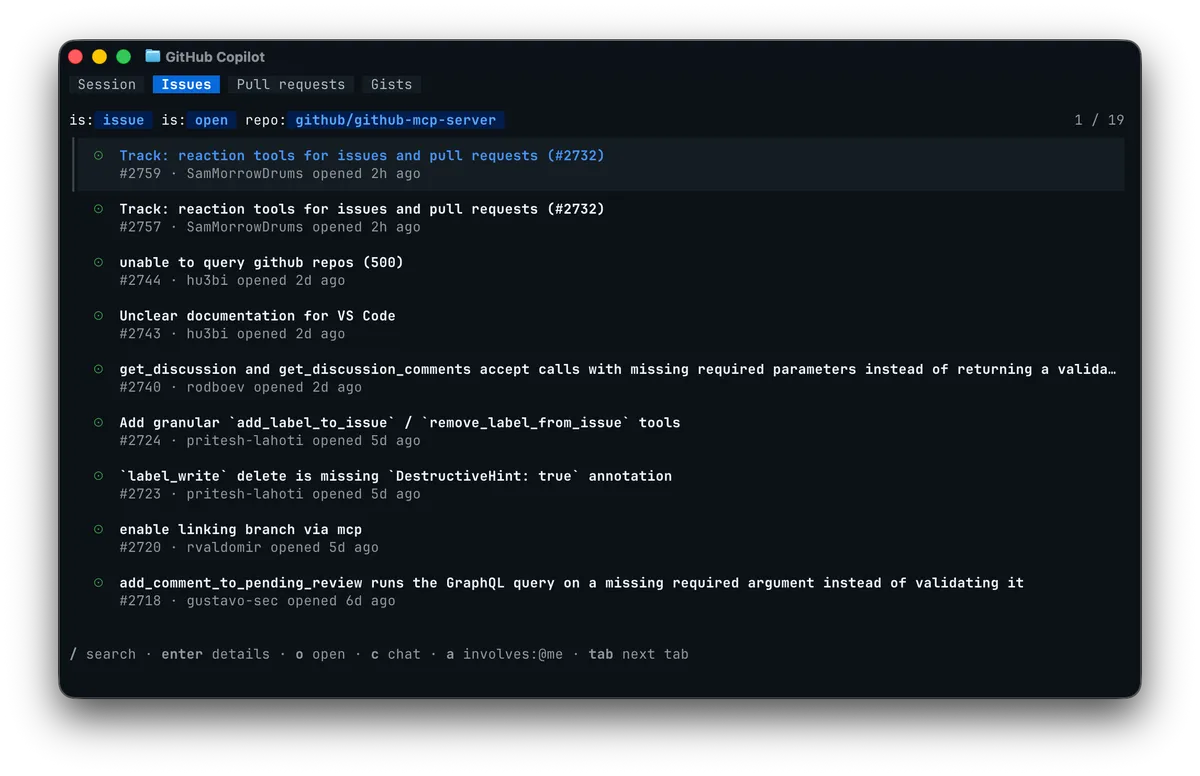
The tabbed layout previewed at Microsoft Build 2026 is out for all Copilot subscribers. You get Issue and PR tabs for the repo you're in, guided MCP and plugin setup, BYOK support in the Copilot app, and screen reader accessibility.
GitHub announced on June 23 that the redesigned Copilot CLI terminal interface is generally available for all Copilot subscribers. The design was previewed at Microsoft Build 2026; it’s now shipping to everyone.
What Changed in the Interface
The most visible change is the tab bar at the top of every Copilot CLI session. There are two always-present tabs: Session (the default chat view) and Gists. When you open Copilot CLI inside a Git repository, you also get Issues and Pull Requests tabs for that repo.
You navigate between tabs with Tab, or click with a mouse. Inside the Issues or Pull Requests tab, you can highlight any item and press c to drop a reference to it into your current prompt. From there you can ask Copilot to investigate it, draft a fix, comment on it, or kick off a review without leaving the terminal.
If you prefer the old single-view layout, you can reorder, hide, or turn off the tab bar entirely from Settings.
Setup Is Now Guided
Previously, configuring tools that extend Copilot CLI meant editing configuration files by hand. That’s gone. Everything is now discoverable and configurable inside an active session:
/mcp addor/mcp searchto add MCP servers/skillsto toggle available skills/pluginto browse and install plugins/settingsto adjust preferences
There’s also a new /theme command for picking a color mode. Options include default, dim, high-contrast, and colorblind. The interface now uses semantic colors tied to your terminal theme rather than hard-coded values, and screen reader support activates automatically when detected.
BYOK in the Copilot App
Separately, also on June 23, the Copilot app (the standalone desktop experience GitHub launched earlier this month) added bring-your-own-key support. You can now run agent sessions against OpenAI, Azure OpenAI, or Anthropic using your own API keys. Previously the app was locked to GitHub’s hosted models.
This matters for teams that have enterprise agreements with model providers, or who want to test different models without going through GitHub’s billing system.
Getting Updated
Run copilot update in your terminal to get the new interface. Feedback goes through the /feedback command or the Copilot CLI public repository.
Sources: Copilot CLI: New terminal interface is generally available, GitHub Copilot app: BYOK support